# 免费HTTPS/SSL证书申请教程

# https证书管理系统- 自动化签发

### 第一步：前往网站，注册账户

##### **[https://www.lingyanspace.com/](https://www.lingyanspace.com/)**

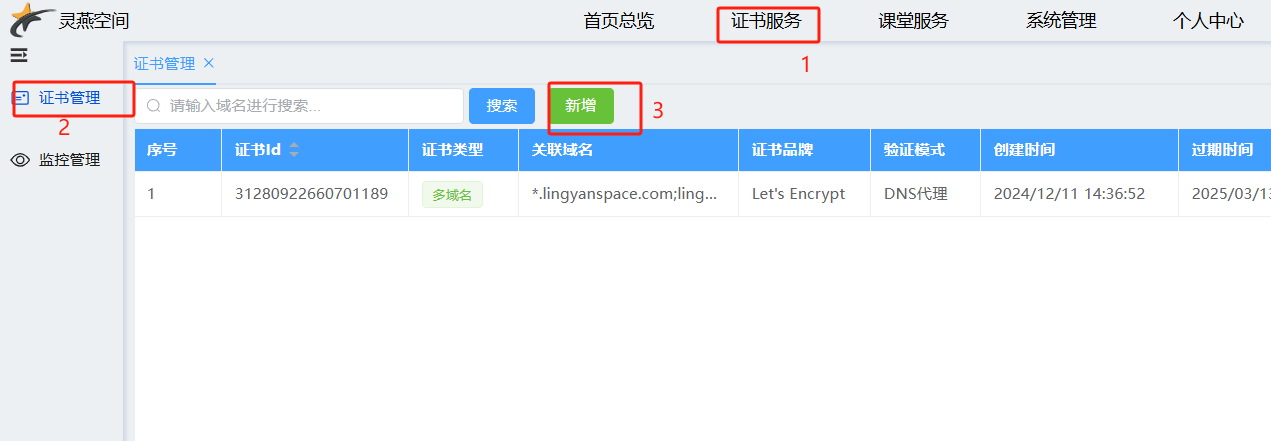
### 第二步：进入证书服务菜单，点击新增证书

[![1734573618589.png](https://book.lingyanspace.com/uploads/images/gallery/2024-12/scaled-1680-/DS8y1n0ploECVc4A-1734573618589.png)](https://book.lingyanspace.com/uploads/images/gallery/2024-12/DS8y1n0ploECVc4A-1734573618589.png)

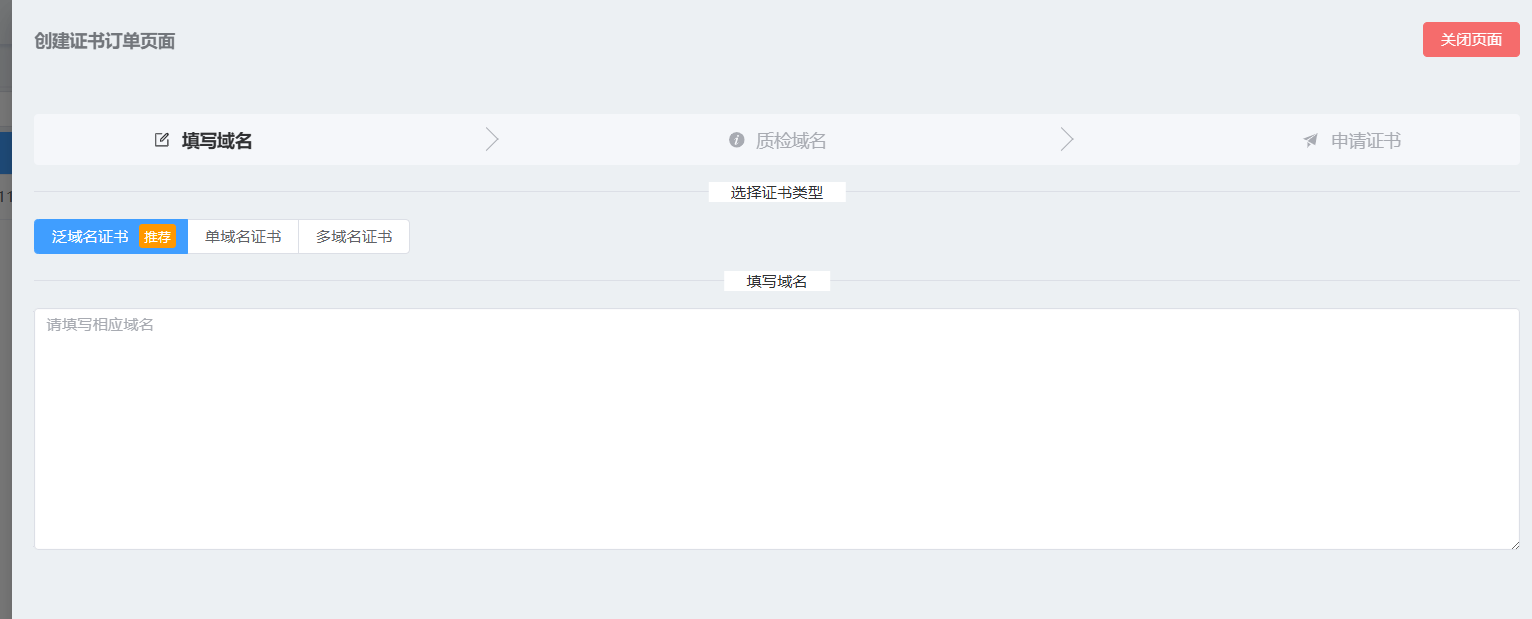
### <span style="color: rgb(0, 0, 0);">第三步：填写自有的域名，点击创建订单</span>

[![1734573968945.png](https://book.lingyanspace.com/uploads/images/gallery/2024-12/scaled-1680-/VnOJ1ZWuTJldNl37-1734573968945.png)](https://book.lingyanspace.com/uploads/images/gallery/2024-12/VnOJ1ZWuTJldNl37-1734573968945.png)

<span style="color: rgb(224, 62, 45);">多域名证书，填写例子（多个域名之间应该换行）：</span>

<span style="color: rgb(0, 0, 0);">lingyanspace.com  
\*.lingyanspace.com</span>

<span style="color: rgb(224, 62, 45);">泛域名证书，只能填写一个泛域名，填写例子：</span>

<span style="color: rgb(0, 0, 0);">\*.lingyanspace.com</span>

<span style="color: rgb(224, 62, 45);">单域名证书，只能填写一个单域名，填写例子：</span>

<span style="color: rgb(0, 0, 0);">www.lingyanspace.com</span>

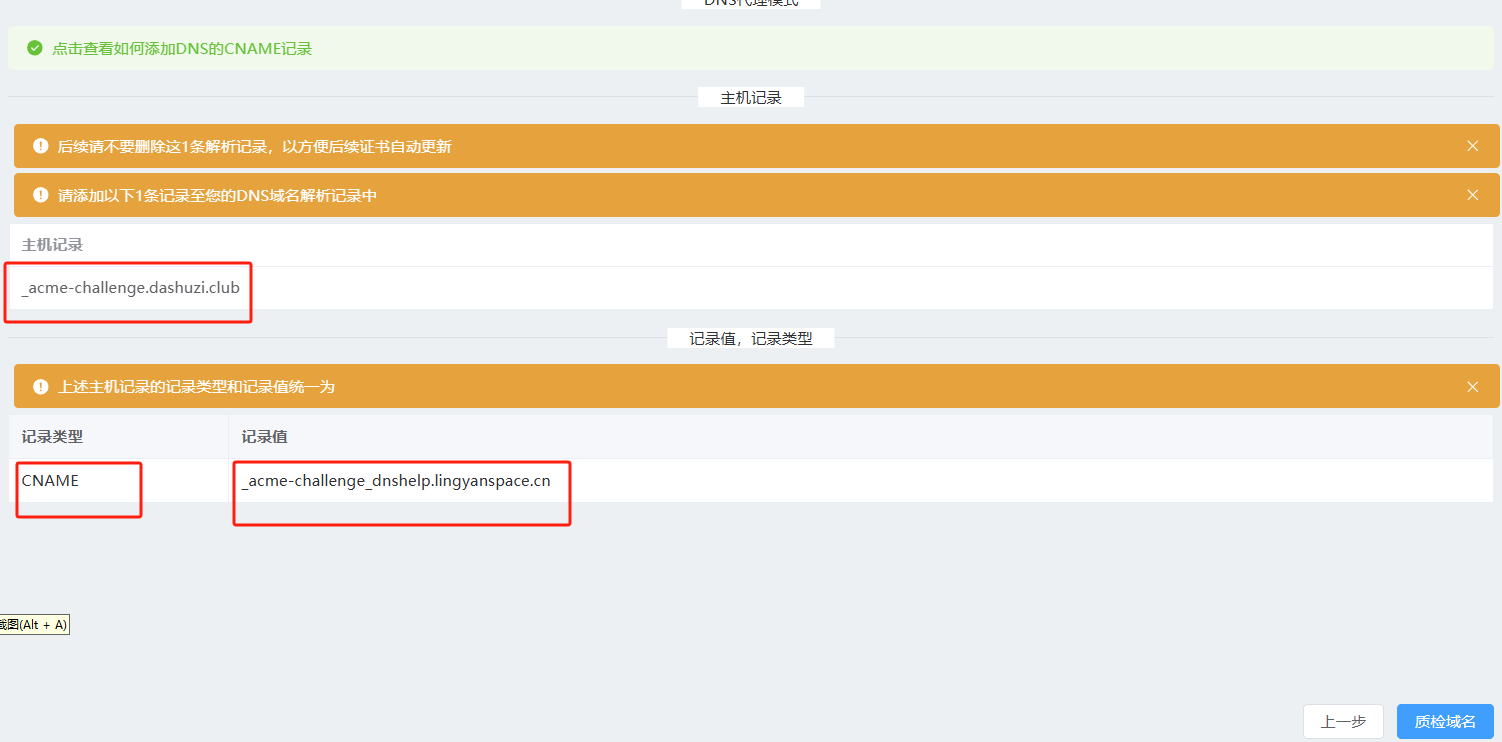
### 第四步：添加云厂商的云解析DNS记录，点击质检域名

[![1734575384538.png](https://book.lingyanspace.com/uploads/images/gallery/2024-12/scaled-1680-/QPuFCJzrZfb99YQc-1734575384538.png)](https://book.lingyanspace.com/uploads/images/gallery/2024-12/QPuFCJzrZfb99YQc-1734575384538.png)

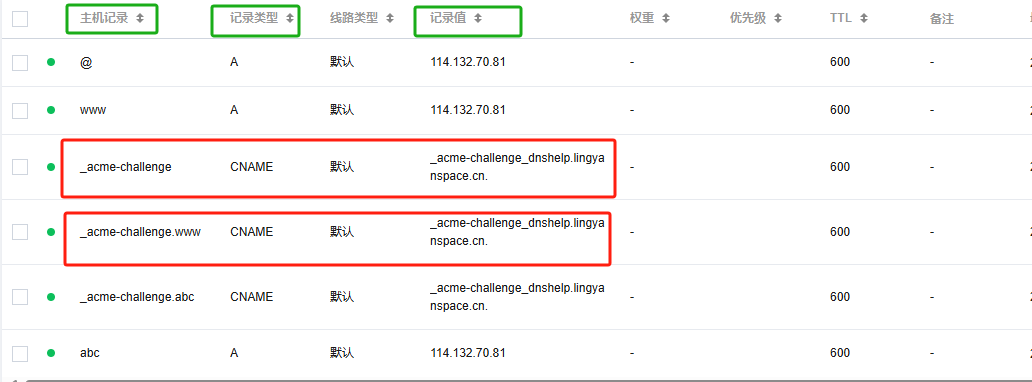
注意：主机记录一般只需要填写根域名之前的即可，例如图中是<span style="color: rgb(45, 194, 107);">**\_acme-challenge.dashuzi.club**</span>，那么只需要填写<span style="color: rgb(224, 62, 45);">\_acme-challenge</span>，假如是<span style="color: rgb(45, 194, 107);">\_acme-challenge.www.dashuzi.club</span>,那么需要填写<span style="color: rgb(224, 62, 45);">\_acme-challenge.www</span>，记录类型与记录值统一填写页面内容，例如我的图中云厂商解析记录就是这样填写的。

[![1734575788414(1).png](https://book.lingyanspace.com/uploads/images/gallery/2024-12/scaled-1680-/IZBfw1c9rdWFx84K-17345757884141.png)](https://book.lingyanspace.com/uploads/images/gallery/2024-12/IZBfw1c9rdWFx84K-17345757884141.png)

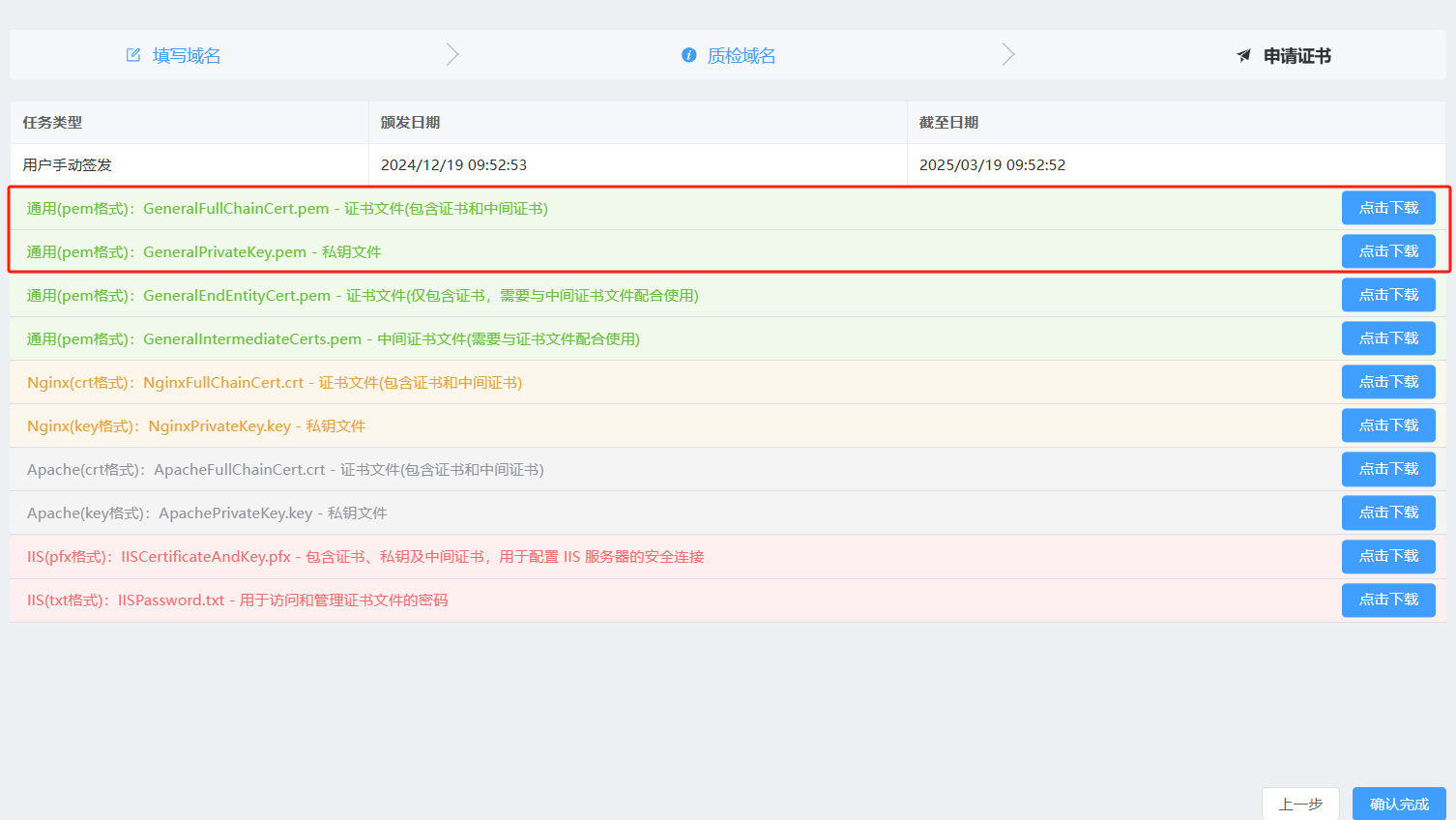
### 第五步：确认完成

[![1734576747652.png](https://book.lingyanspace.com/uploads/images/gallery/2024-12/scaled-1680-/AQ3RE4Zu9FZJvcuz-1734576747652.png)](https://book.lingyanspace.com/uploads/images/gallery/2024-12/AQ3RE4Zu9FZJvcuz-1734576747652.png)

<span style="color: rgb(224, 62, 45);">此时可以直接在当前页面下载，也可以直接确认完成</span>

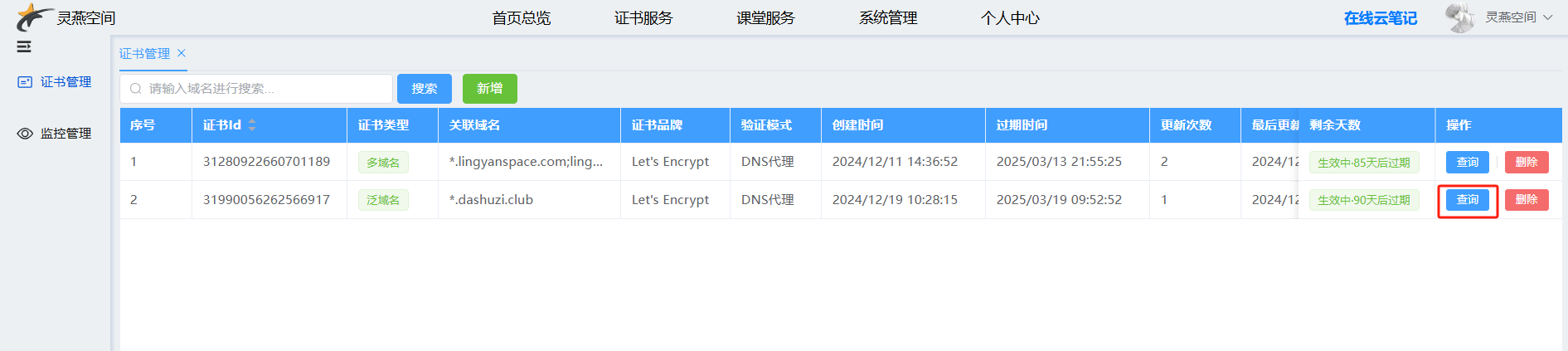
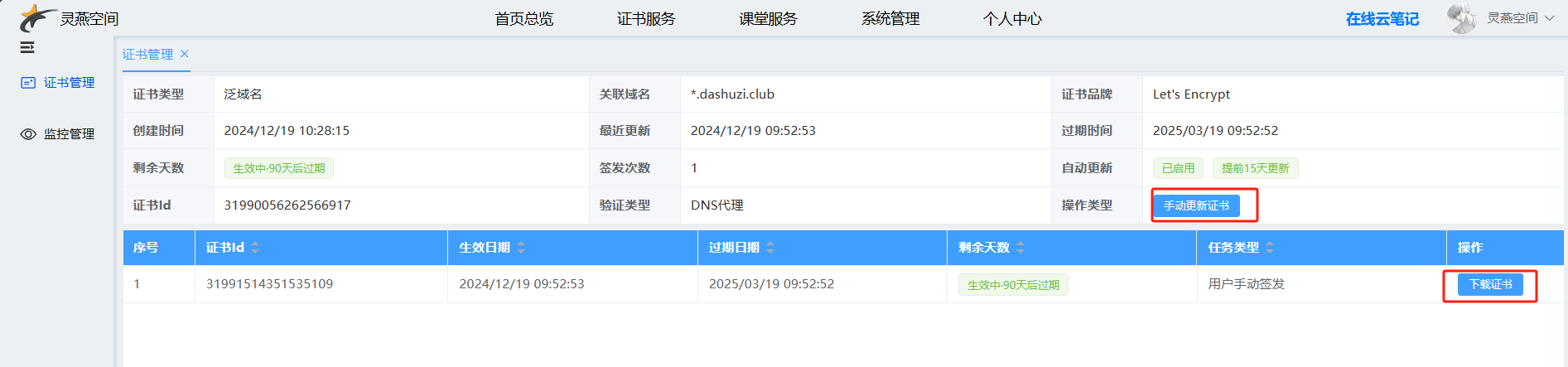
### 后续补充：查看证书，下载证书，更新证书，定时更新

[![1734576953755.png](https://book.lingyanspace.com/uploads/images/gallery/2024-12/scaled-1680-/79haw3m6EVHJWlUJ-1734576953755.png)](https://book.lingyanspace.com/uploads/images/gallery/2024-12/79haw3m6EVHJWlUJ-1734576953755.png)

[![1734576982445.png](https://book.lingyanspace.com/uploads/images/gallery/2024-12/scaled-1680-/XFy1h2dqVHFRmxHg-1734576982445.png)](https://book.lingyanspace.com/uploads/images/gallery/2024-12/XFy1h2dqVHFRmxHg-1734576982445.png)
[![1734577015172.png](https://book.lingyanspace.com/uploads/images/gallery/2024-12/scaled-1680-/Kg3igcxVSKlvjLxM-1734577015172.png)](https://book.lingyanspace.com/uploads/images/gallery/2024-12/Kg3igcxVSKlvjLxM-1734577015172.png)
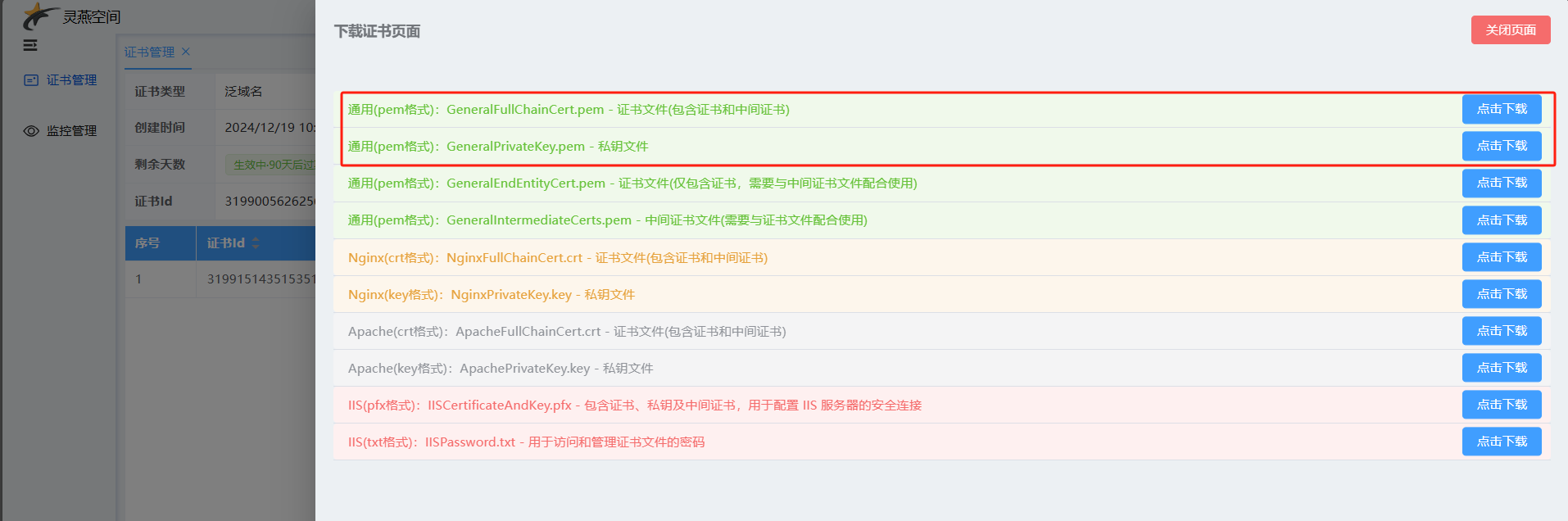
[![1734577228561(1).png](https://book.lingyanspace.com/uploads/images/gallery/2024-12/scaled-1680-/NUkPtXOExNXDK045-17345772285611.png)](https://book.lingyanspace.com/uploads/images/gallery/2024-12/NUkPtXOExNXDK045-17345772285611.png)
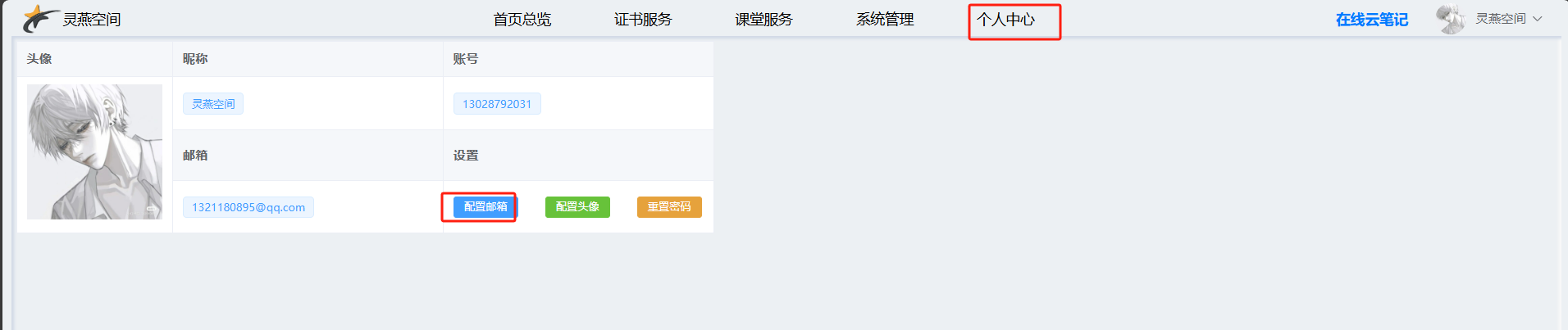
<span style="color: rgb(224, 62, 45);">注意1：一般在证书过期前15天会自动更新证书，更新成功将会发送电子邮件，但是前提需要你在个人中心页面配置你的邮箱；</span>

<span style="color: rgb(224, 62, 45);">注意2：也可以手动更新证书，前提是上次在云厂商的云解析DNS记录当中未删除，更新后可以下载最新签发的证书。</span>

# https证书管理系统- 自动化部署

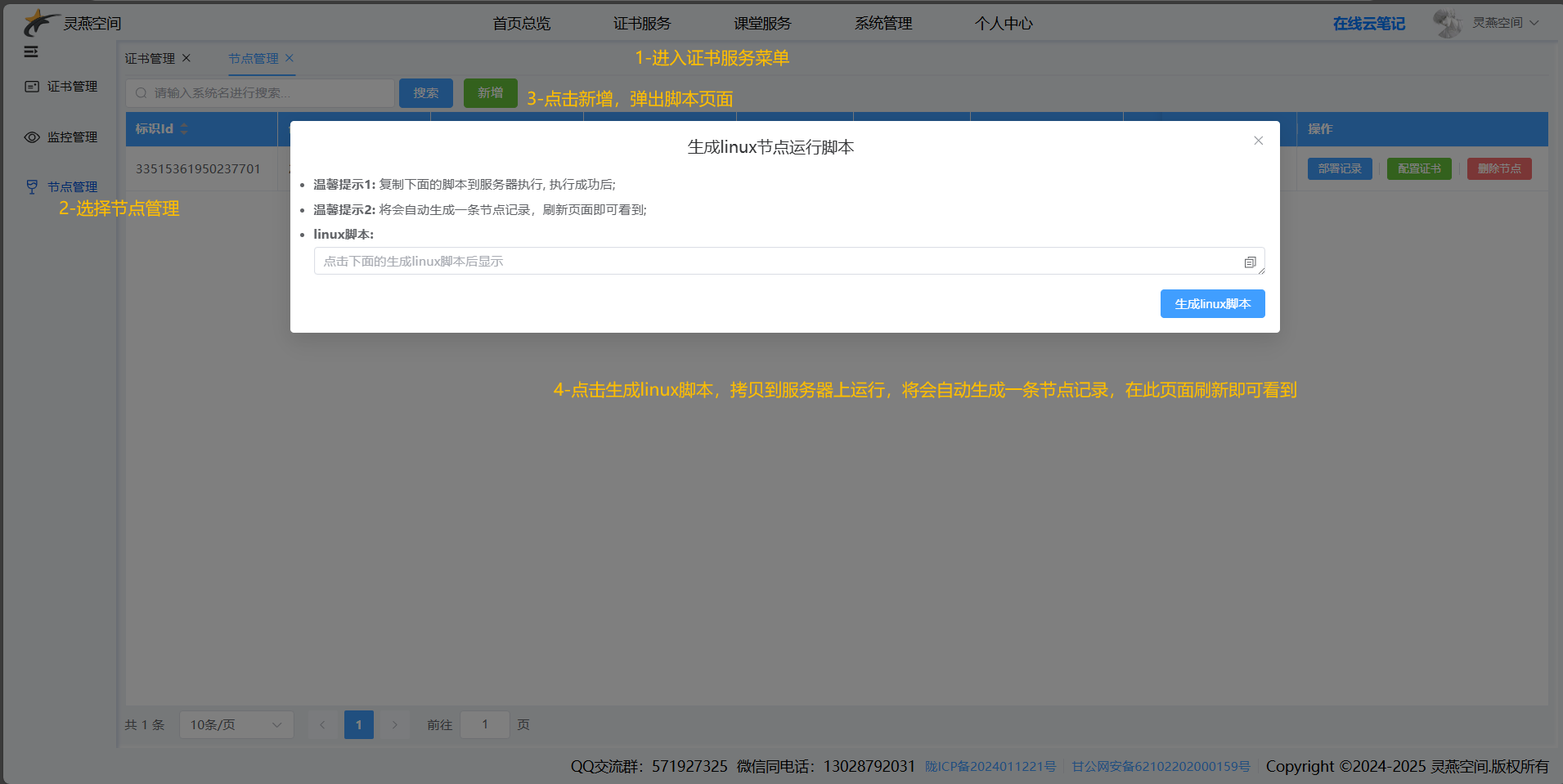
### 步骤1：复制生成的linux脚本命令

[![1736254223241.png](https://book.lingyanspace.com/uploads/images/gallery/2025-01/scaled-1680-/EBH6N2KIqHj0d1Rv-1736254223241.png)](https://book.lingyanspace.com/uploads/images/gallery/2025-01/EBH6N2KIqHj0d1Rv-1736254223241.png)

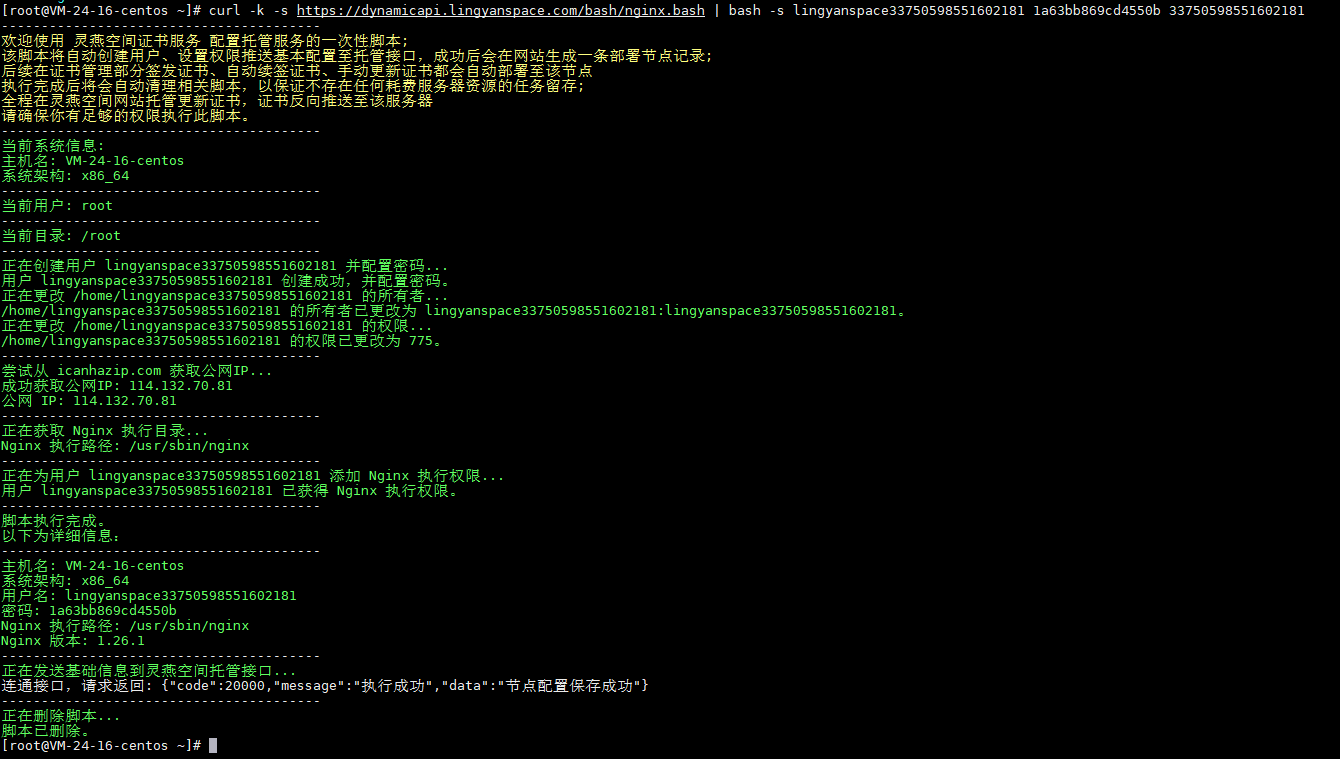
### 步骤2：拷贝到部署站点的linux服务器上运行

[![1736254367490.png](https://book.lingyanspace.com/uploads/images/gallery/2025-01/scaled-1680-/sMxVXniKP8SHtSLk-1736254367490.png)](https://book.lingyanspace.com/uploads/images/gallery/2025-01/sMxVXniKP8SHtSLk-1736254367490.png)

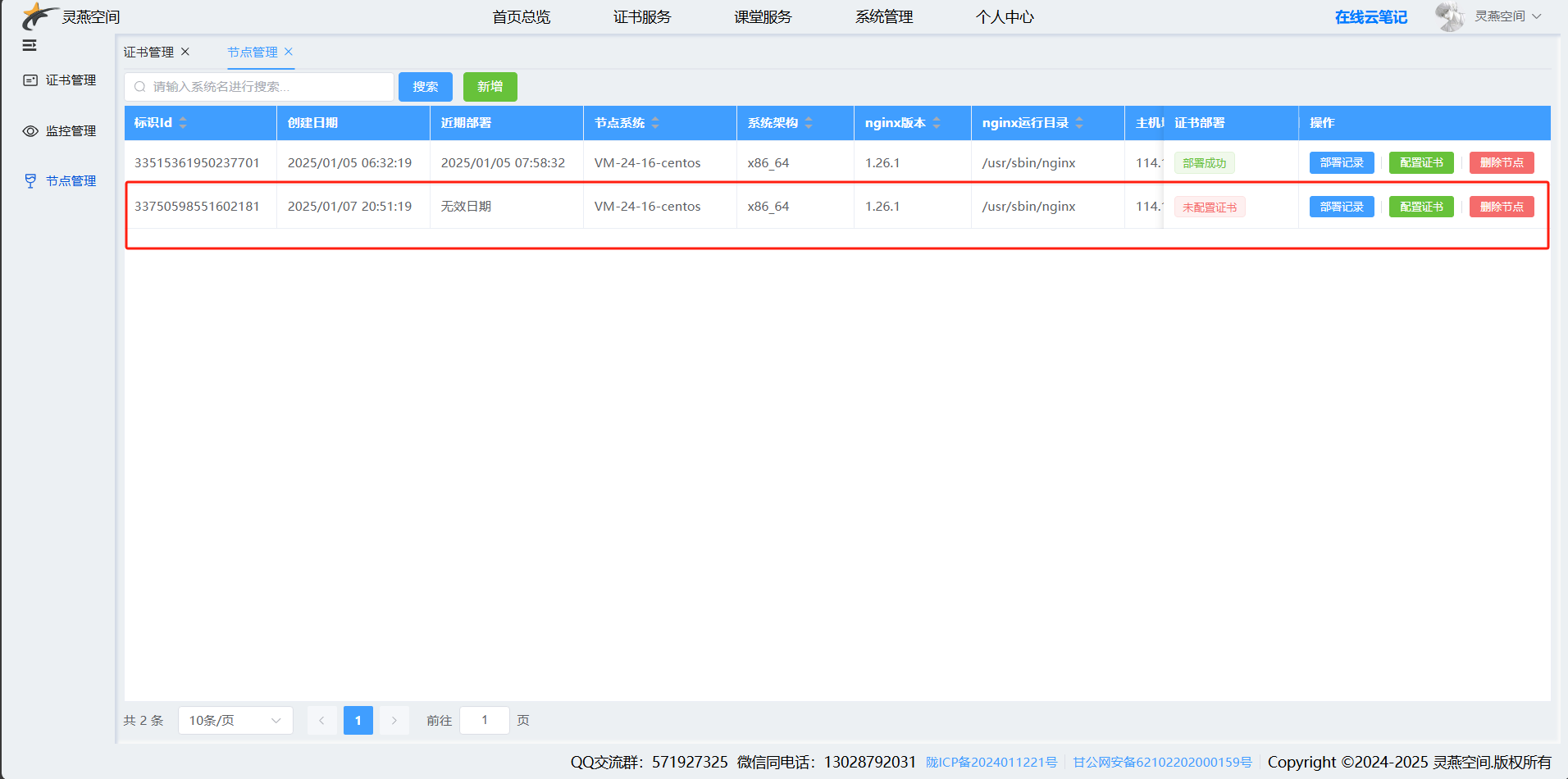
### 步骤三：刷新页面，即可看到此时的节点记录

[![1736254440104.png](https://book.lingyanspace.com/uploads/images/gallery/2025-01/scaled-1680-/MgEqM9dlbaun2cYv-1736254440104.png)](https://book.lingyanspace.com/uploads/images/gallery/2025-01/MgEqM9dlbaun2cYv-1736254440104.png)

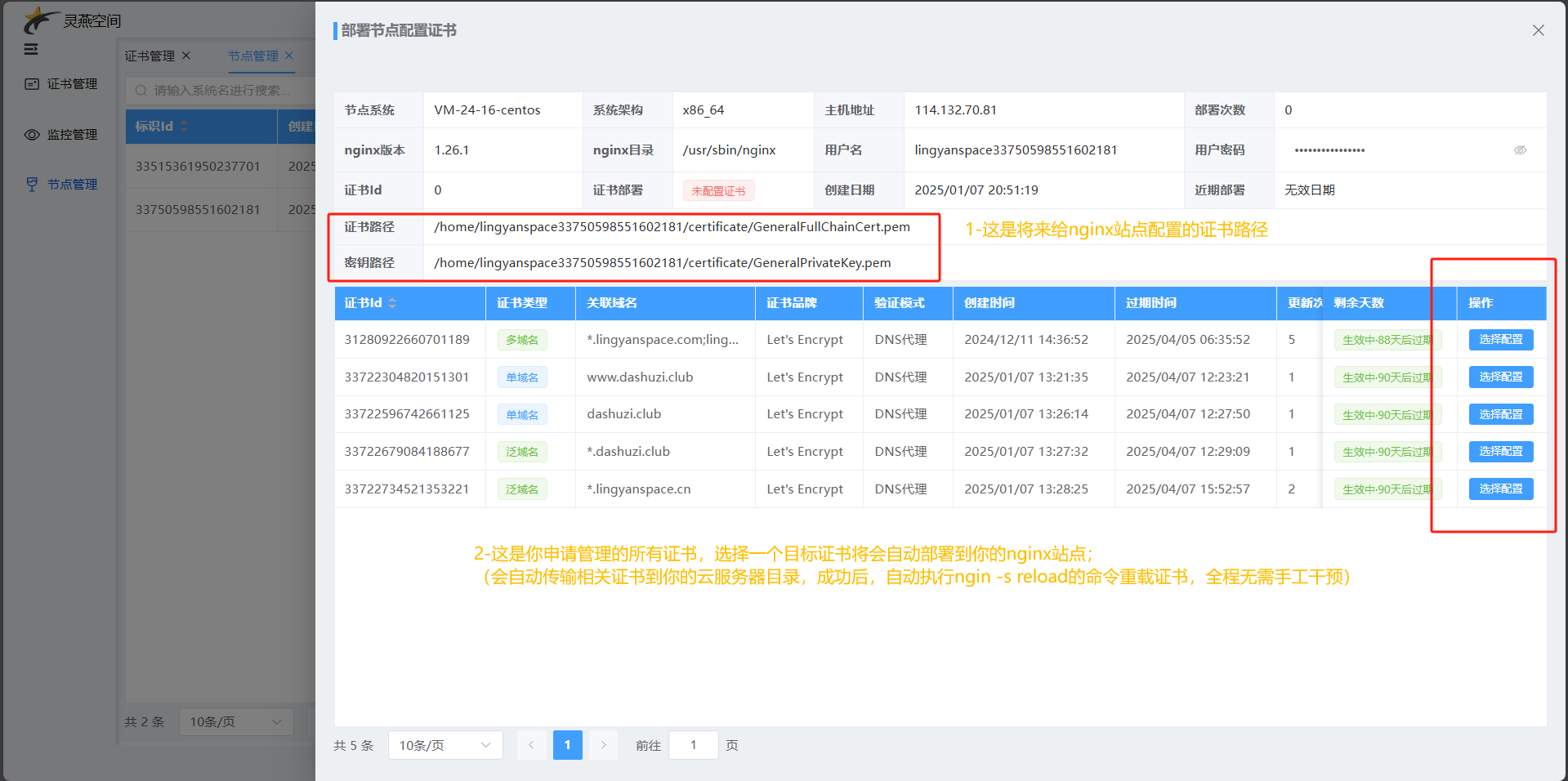
### 步骤四：点击“<span style="color: rgb(53, 152, 219);">**配置证书**</span>”，选择证书后自动部署

[![1736254777559.png](https://book.lingyanspace.com/uploads/images/gallery/2025-01/scaled-1680-/8qGDd6iLuXyBhkRG-1736254777559.png)](https://book.lingyanspace.com/uploads/images/gallery/2025-01/8qGDd6iLuXyBhkRG-1736254777559.png)

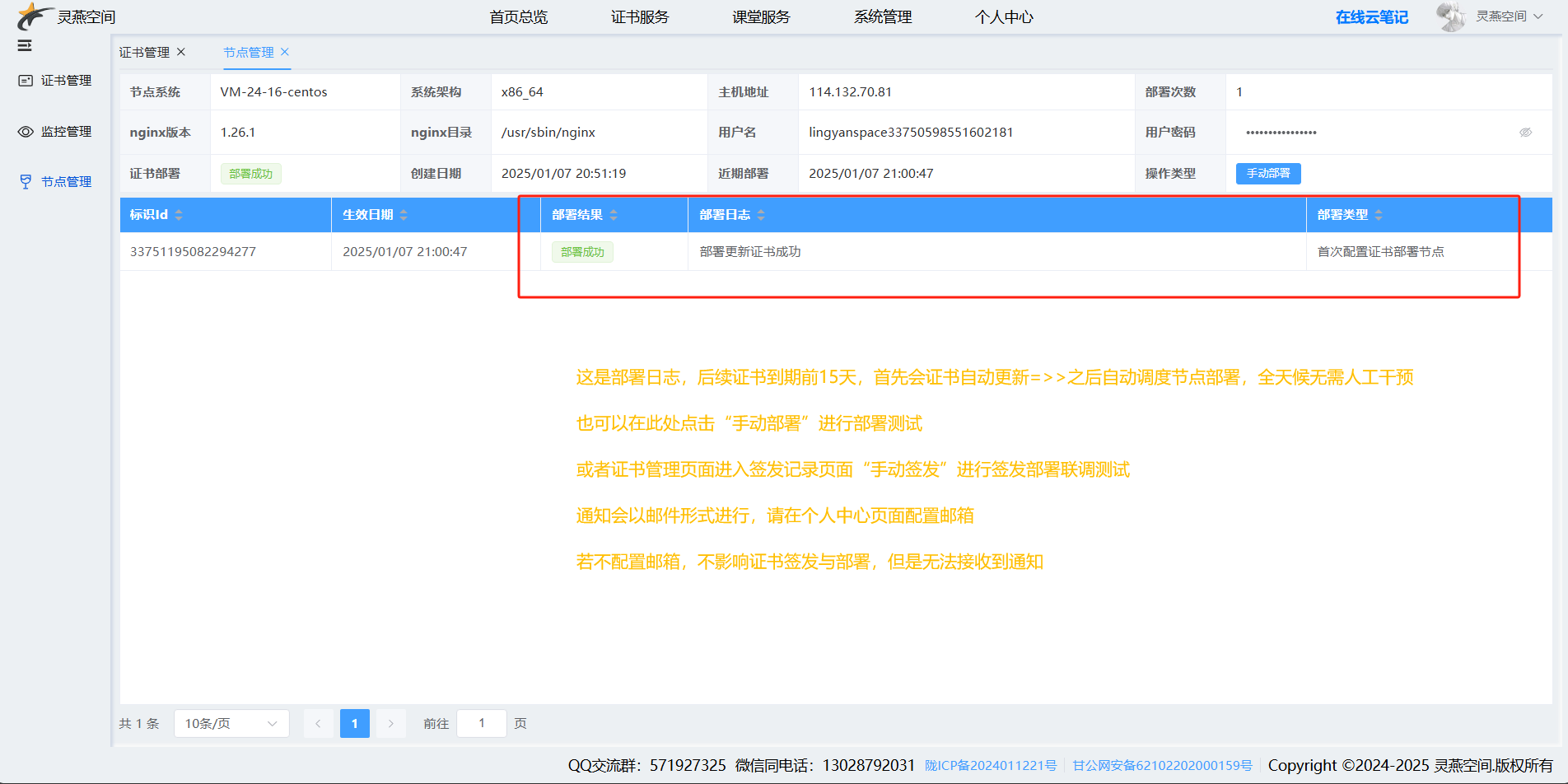
### 步骤五：节点部署已完成，后续自动调度部署，无需干预

[![1736255162400.png](https://book.lingyanspace.com/uploads/images/gallery/2025-01/scaled-1680-/sg5tZGZTdLVPKKrs-1736255162400.png)](https://book.lingyanspace.com/uploads/images/gallery/2025-01/sg5tZGZTdLVPKKrs-1736255162400.png)

# https证书管理系统- 自动化监控

### 步骤1：新增域名监控，或证书监控

[![1736255438280.png](https://book.lingyanspace.com/uploads/images/gallery/2025-01/scaled-1680-/6JVMDTWXb11fP98T-1736255438280.png)](https://book.lingyanspace.com/uploads/images/gallery/2025-01/6JVMDTWXb11fP98T-1736255438280.png)

##### **<span style="color: rgb(241, 196, 15);">注意：</span>**

##### **<span style="color: rgb(241, 196, 15);">如果证书部署在线上推荐选择域名监控</span>**

##### **<span style="color: rgb(241, 196, 15);">如果证书已申请但是还未部署在线上，则选择证书监控</span>**

### 步骤2：查询监控记录详情

[![1736255511325.png](https://book.lingyanspace.com/uploads/images/gallery/2025-01/scaled-1680-/XQ2qR1npImaWWxbm-1736255511325.png)](https://book.lingyanspace.com/uploads/images/gallery/2025-01/XQ2qR1npImaWWxbm-1736255511325.png)

### 步骤3：在详情页查看每日定时检测结果，也可手动测试

[![1736256039493.png](https://book.lingyanspace.com/uploads/images/gallery/2025-01/scaled-1680-/7j7CCFZcNHMgm8n9-1736256039493.png)](https://book.lingyanspace.com/uploads/images/gallery/2025-01/7j7CCFZcNHMgm8n9-1736256039493.png)

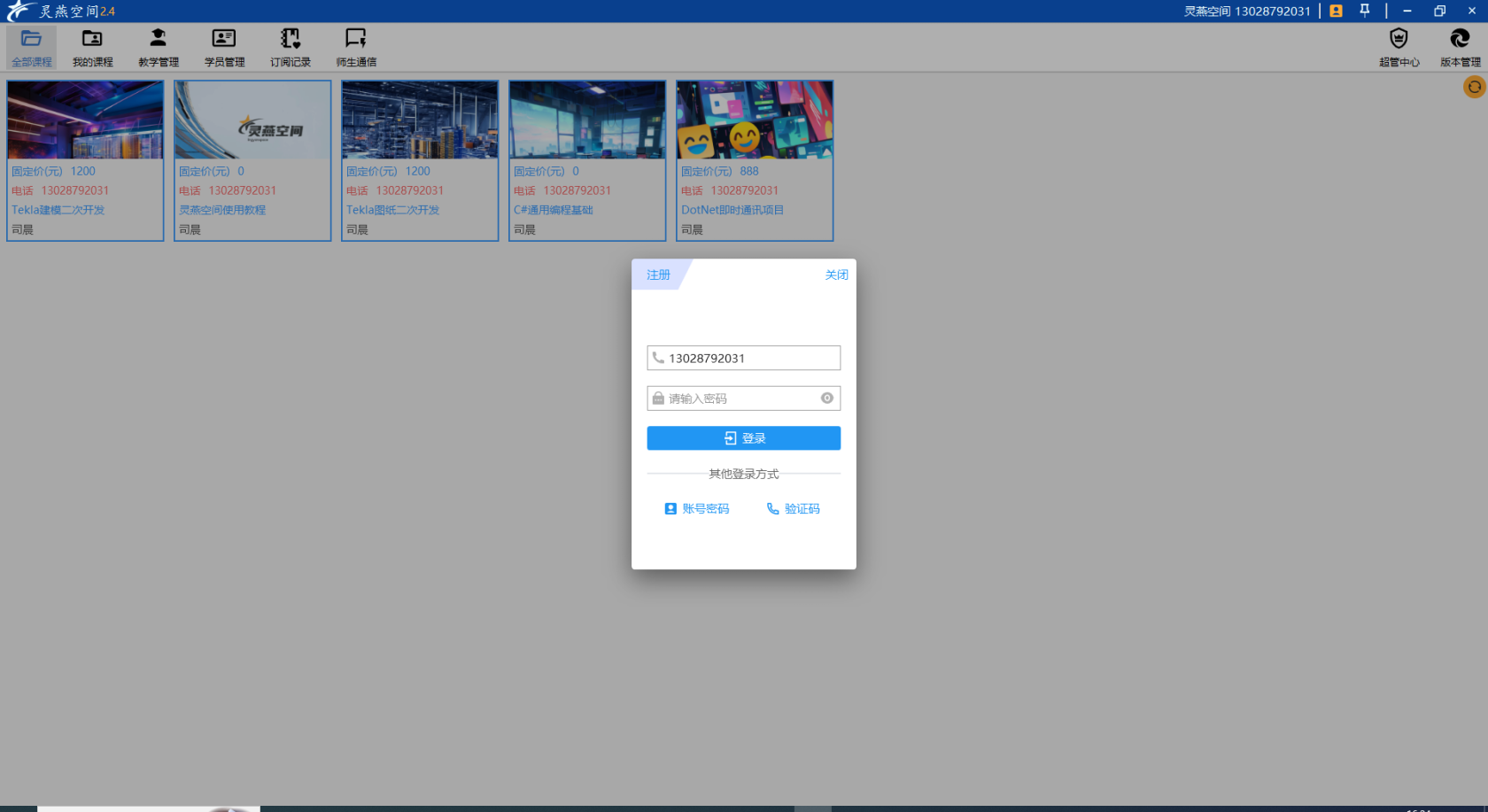
# 灵燕课堂软件介绍

### 下载：

#### [跳转下载灵燕课堂PC软件](https://book.lingyanspace.com/attachments/3)

### 介绍:

#### [点击跳转视频介绍](https://book.lingyanspace.com/attachments/4)

### 描述：

```nginx
服务于灵燕系列课程视频云点播软件；
采用自研视频高质量收缩技术保证观看清晰度；
动态切片技术提高加载大视频效率，即使几个小时的视频也可做到1s内加载；
云点播服务于SAAS权限代理分割，进行更加精细化的权限控制；
老师们可以入住发布自己的课程，学员可自行订阅课程，也可老师添加学员；
----特此声明
本软件不接入任何付费流程，纯粹云点播平台，收费付费请自行解决。
```

### 效果图：

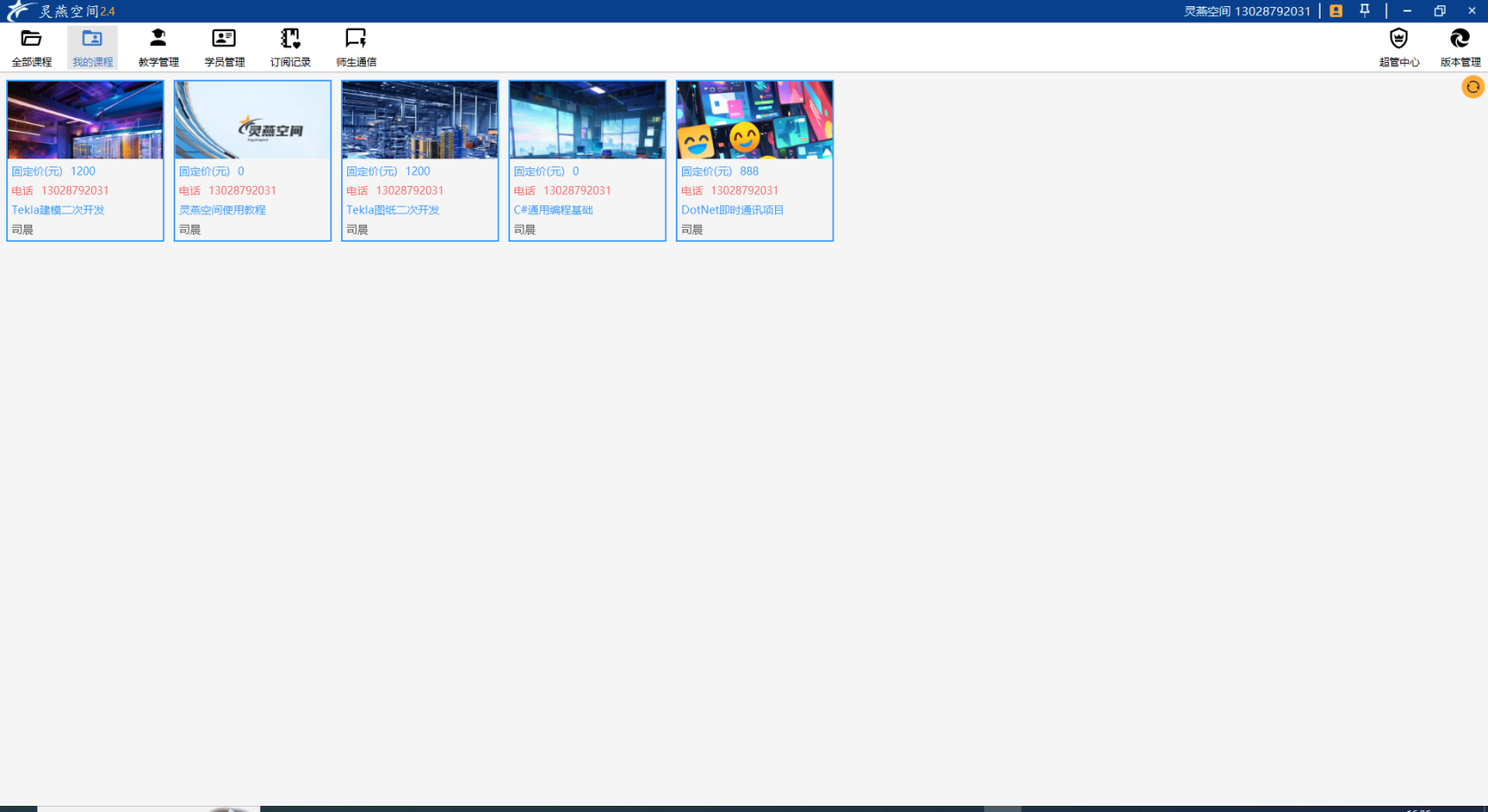
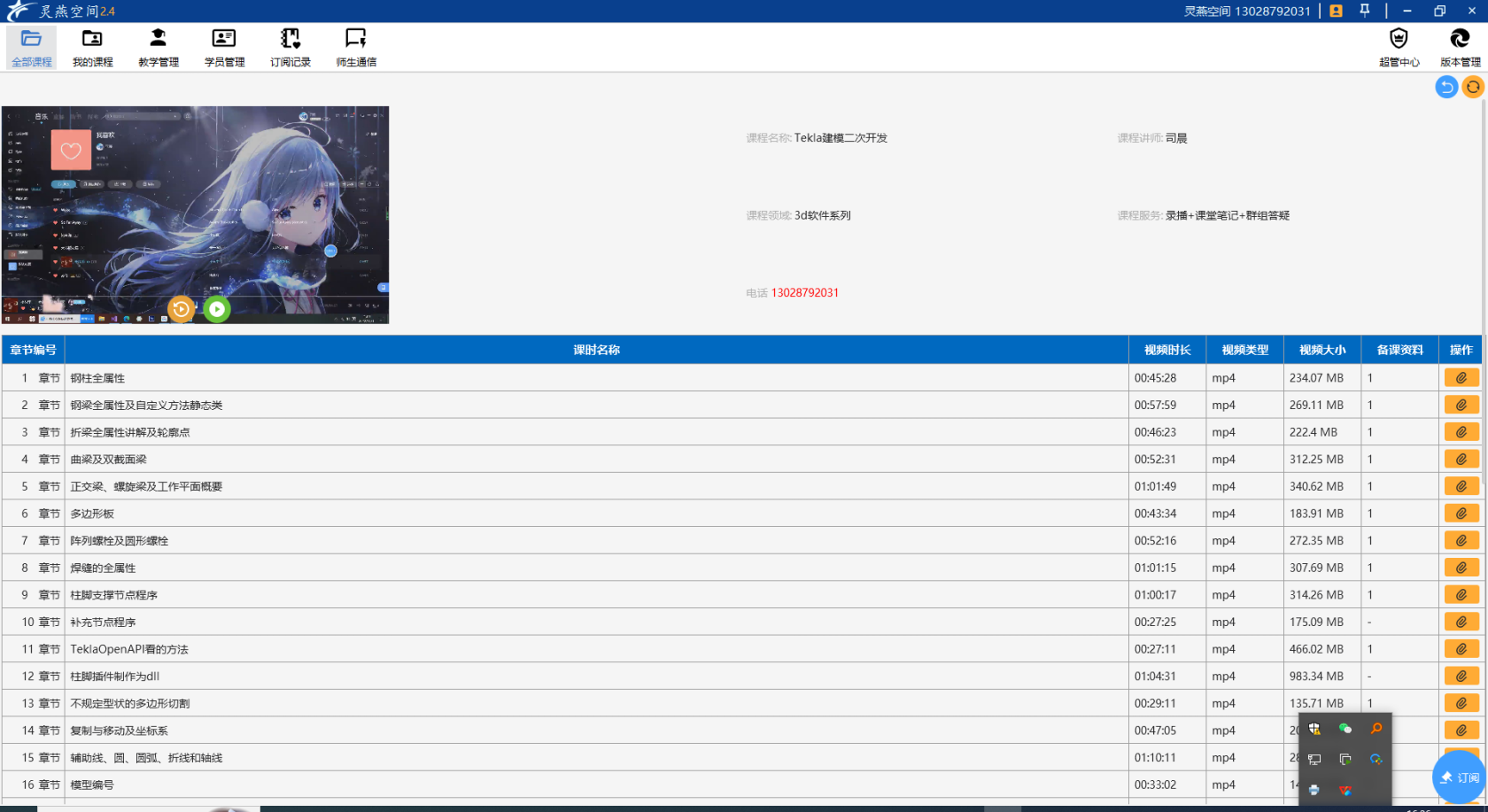
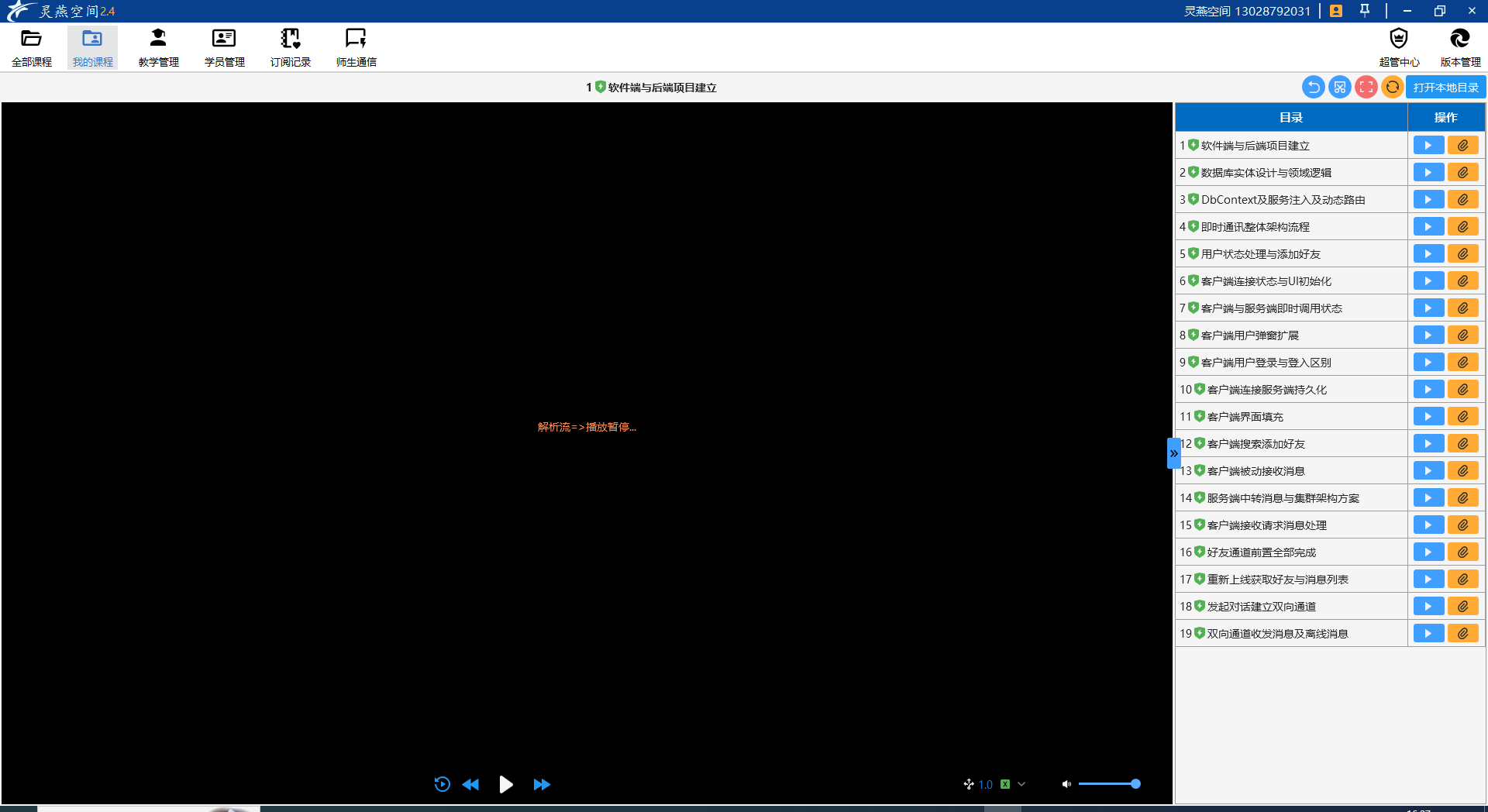
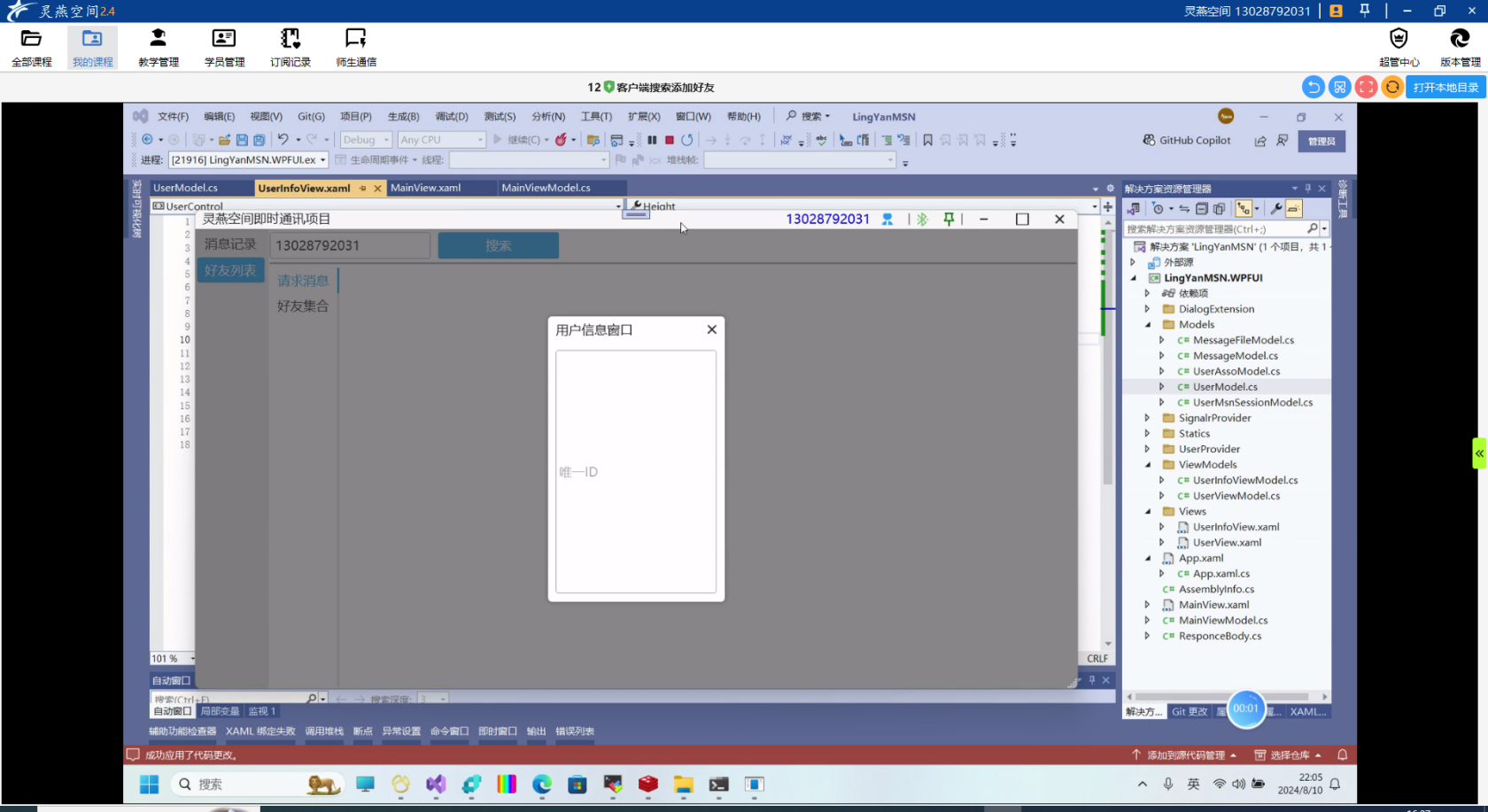
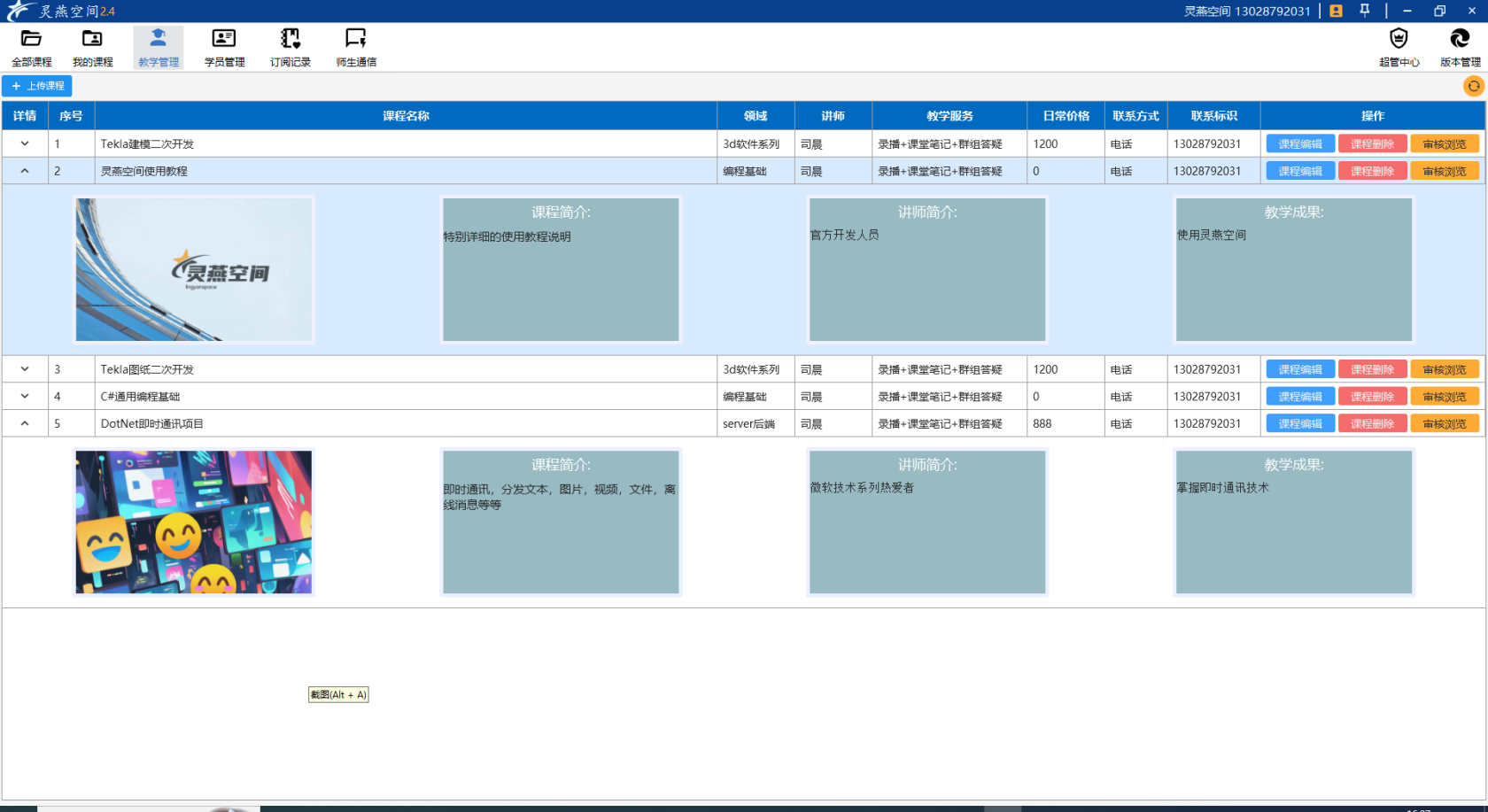
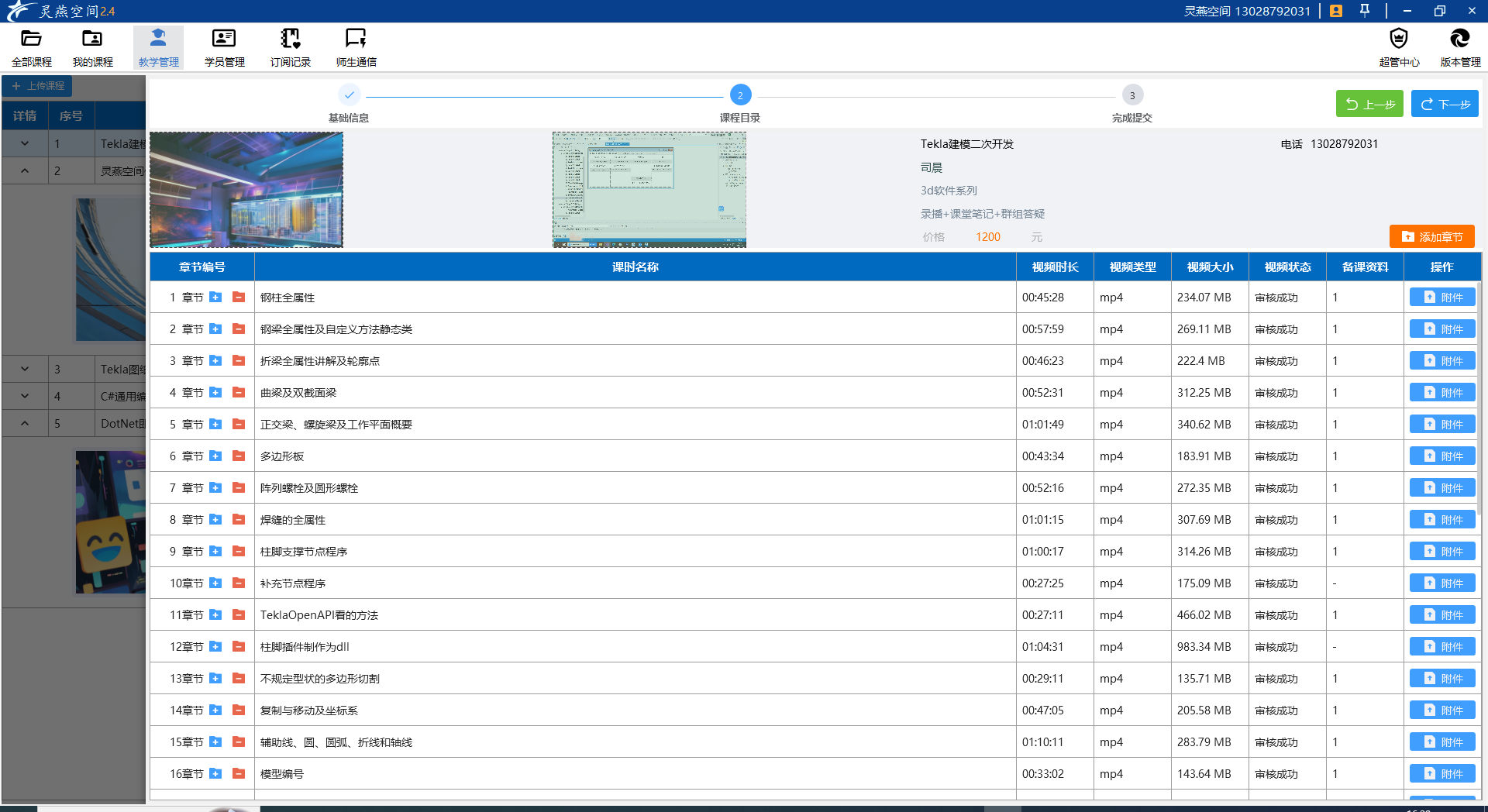
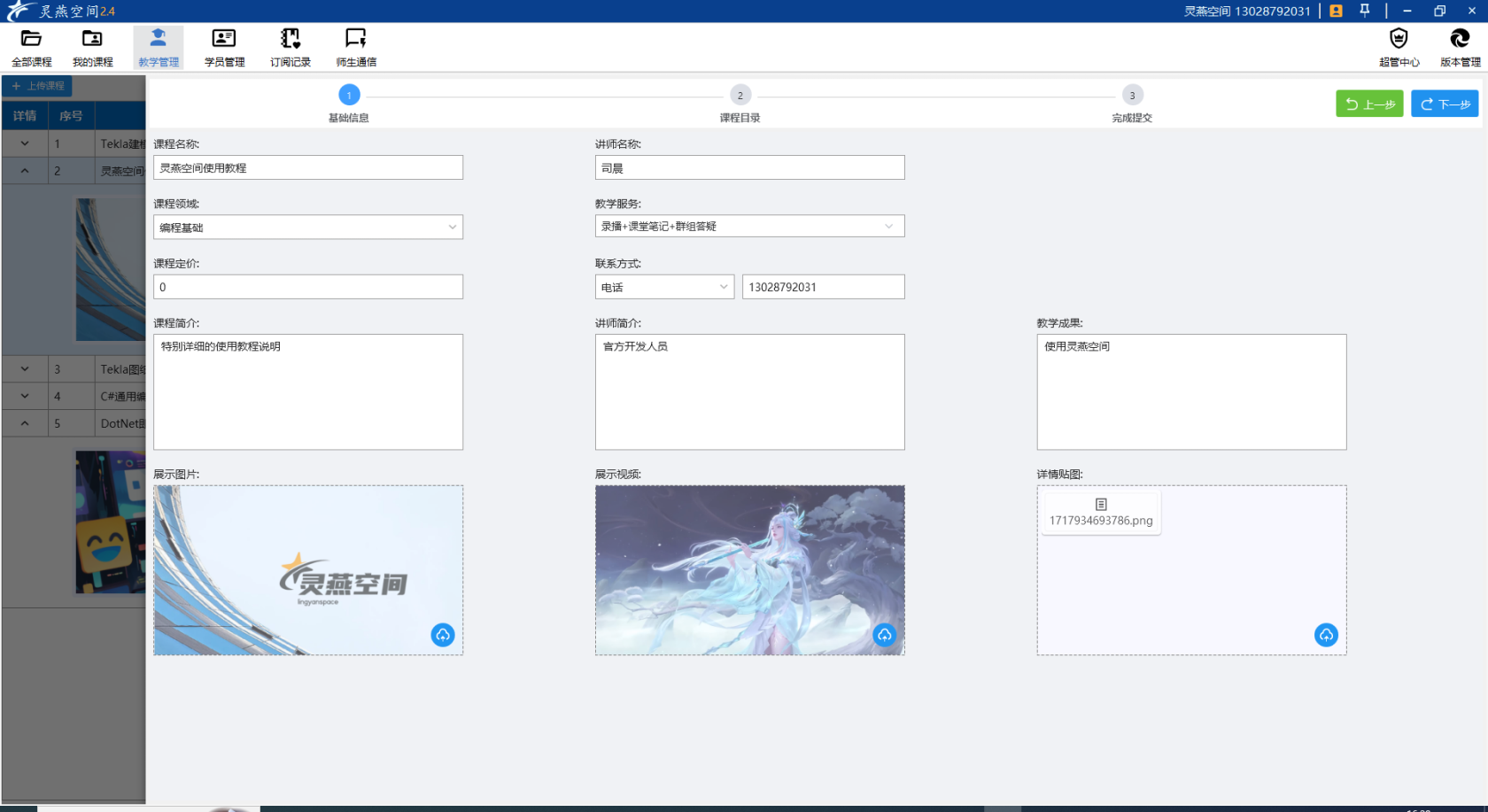
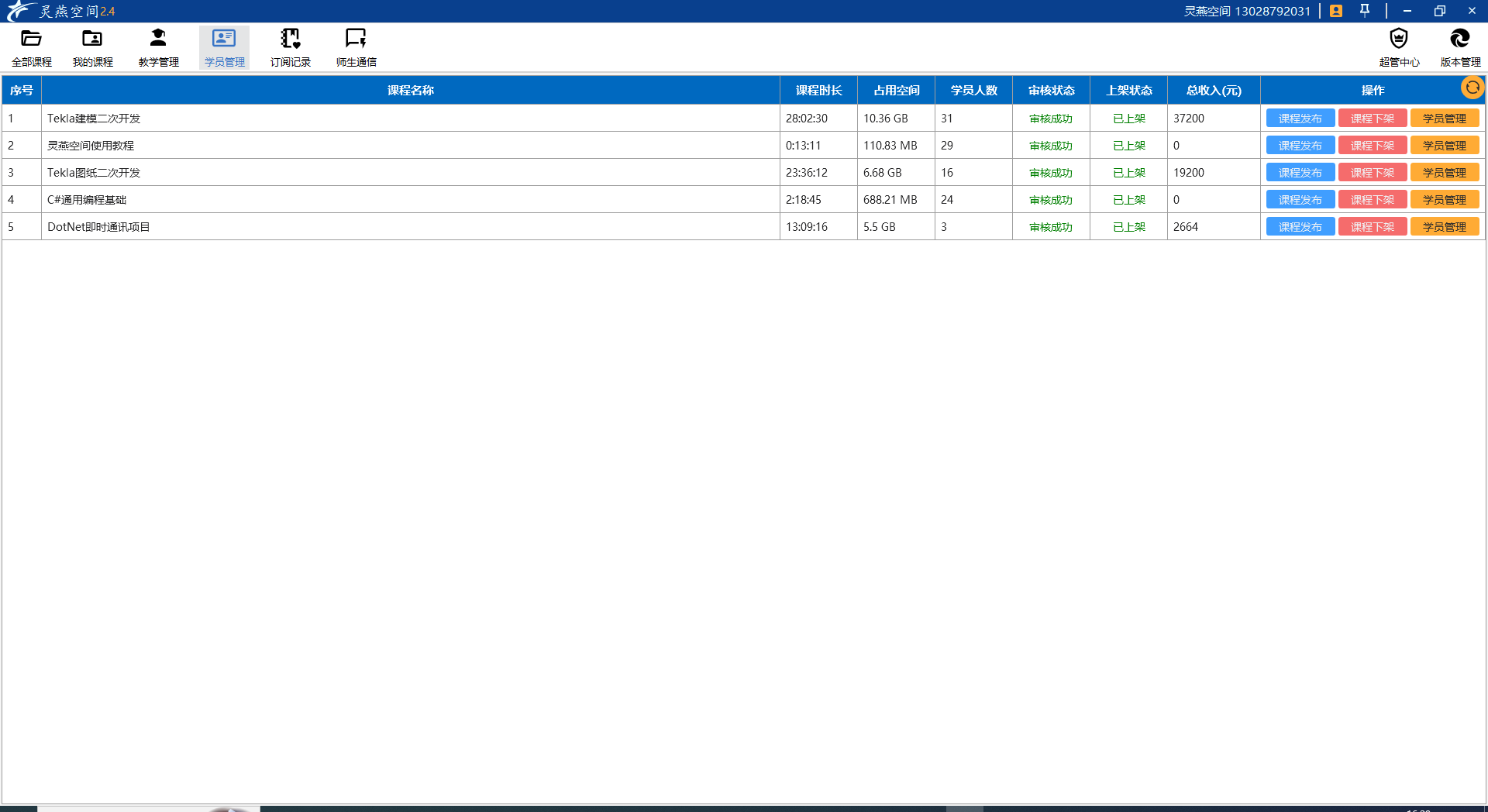
<table border="1" class="align-center" id="bkmrk-%C2%A0-%C2%A0" style="border-collapse: collapse; width: 100%; height: 4771.58px; border-width: 2px; border-color: rgb(185, 106, 217);"><colgroup><col style="width: 100%;"></col></colgroup><tbody><tr style="height: 467.699px;"><td style="height: 467.699px; border-color: rgb(185, 106, 217); border-width: 2px;">[![1731399926021.png](https://book.lingyanspace.com/uploads/images/gallery/2024-11/scaled-1680-/s5acJis1N98aqpvB-1731399926021.png)](https://book.lingyanspace.com/uploads/images/gallery/2024-11/s5acJis1N98aqpvB-1731399926021.png)</td></tr><tr style="height: 467.699px;"><td style="height: 467.699px; border-color: rgb(185, 106, 217); border-width: 2px;">[![1731400002926.png](https://book.lingyanspace.com/uploads/images/gallery/2024-11/scaled-1680-/8ZooLKa3QIK78Xwm-1731400002926.png)](https://book.lingyanspace.com/uploads/images/gallery/2024-11/8ZooLKa3QIK78Xwm-1731400002926.png)

</td></tr><tr style="height: 467.628px;"><td style="border-color: rgb(185, 106, 217); border-width: 2px; height: 467.628px;">[![1731399982683.png](https://book.lingyanspace.com/uploads/images/gallery/2024-11/scaled-1680-/aN2EtlBv4ySz2tPr-1731399982683.png)](https://book.lingyanspace.com/uploads/images/gallery/2024-11/aN2EtlBv4ySz2tPr-1731399982683.png)

</td></tr><tr style="height: 467.699px;"><td style="height: 467.699px; border-color: rgb(185, 106, 217); border-width: 2px;">[![1731400022840.png](https://book.lingyanspace.com/uploads/images/gallery/2024-11/scaled-1680-/uEMzZv5fucHg5OSs-1731400022840.png)](https://book.lingyanspace.com/uploads/images/gallery/2024-11/uEMzZv5fucHg5OSs-1731400022840.png)</td></tr><tr style="height: 467.699px;"><td style="height: 467.699px; border-color: rgb(185, 106, 217); border-width: 2px;">[![1731400045545.png](https://book.lingyanspace.com/uploads/images/gallery/2024-11/scaled-1680-/dgMSsAdNBaT4OFyl-1731400045545.png)](https://book.lingyanspace.com/uploads/images/gallery/2024-11/dgMSsAdNBaT4OFyl-1731400045545.png)</td></tr><tr style="height: 467.699px;"><td style="height: 467.699px; border-color: rgb(185, 106, 217); border-width: 2px;">[![1731400074119.png](https://book.lingyanspace.com/uploads/images/gallery/2024-11/scaled-1680-/6492KsxgiSVMrthz-1731400074119.png)](https://book.lingyanspace.com/uploads/images/gallery/2024-11/6492KsxgiSVMrthz-1731400074119.png)</td></tr><tr style="height: 467.699px;"><td style="height: 467.699px; border-color: rgb(185, 106, 217); border-width: 2px;">[![1731400124527.png](https://book.lingyanspace.com/uploads/images/gallery/2024-11/scaled-1680-/WaaeLcOYmoiPwluD-1731400124527.png)](https://book.lingyanspace.com/uploads/images/gallery/2024-11/WaaeLcOYmoiPwluD-1731400124527.png)</td></tr><tr style="height: 467.699px;"><td style="height: 467.699px; border-color: rgb(185, 106, 217); border-width: 2px;">[![1731400093854.png](https://book.lingyanspace.com/uploads/images/gallery/2024-11/scaled-1680-/JNU2EmgyARlUGOLh-1731400093854.png)](https://book.lingyanspace.com/uploads/images/gallery/2024-11/JNU2EmgyARlUGOLh-1731400093854.png)</td></tr><tr style="height: 467.614px;"><td style="border-color: rgb(185, 106, 217); border-width: 2px; height: 467.614px;">[![1731400190282.png](https://book.lingyanspace.com/uploads/images/gallery/2024-11/scaled-1680-/e0QTf67SfPoPTWfx-1731400190282.png)](https://book.lingyanspace.com/uploads/images/gallery/2024-11/e0QTf67SfPoPTWfx-1731400190282.png)

</td></tr><tr style="height: 501.222px;"><td style="height: 501.222px; border-color: rgb(185, 106, 217); border-width: 2px;">[![1731400243202.png](https://book.lingyanspace.com/uploads/images/gallery/2024-11/scaled-1680-/XxMJ3hEFqzps20O7-1731400243202.png)](https://book.lingyanspace.com/uploads/images/gallery/2024-11/XxMJ3hEFqzps20O7-1731400243202.png)

</td></tr><tr style="height: 30.6108px;"><td style="border-color: rgb(185, 106, 217); border-width: 2px; height: 30.6108px;">[![1731400264625.png](https://book.lingyanspace.com/uploads/images/gallery/2024-11/scaled-1680-/RIHIFIW251KKDSBZ-1731400264625.png)](https://book.lingyanspace.com/uploads/images/gallery/2024-11/RIHIFIW251KKDSBZ-1731400264625.png)

</td></tr><tr style="height: 30.6108px;"><td style="border-color: rgb(185, 106, 217); border-width: 2px; height: 30.6108px;">[![1731400296210.png](https://book.lingyanspace.com/uploads/images/gallery/2024-11/scaled-1680-/lJX1wnT2fLAVlrdr-1731400296210.png)](https://book.lingyanspace.com/uploads/images/gallery/2024-11/lJX1wnT2fLAVlrdr-1731400296210.png)

</td></tr></tbody></table>

# “此站点的连接不安全”怎么解决？Edge/Chrome 浏览器警告终极指南（2025最新）

<span style="white-space: pre-wrap;">当你在使用 </span>****Microsoft Edge****<span style="white-space: pre-wrap;"> 或 </span>****Google Chrome****<span style="white-space: pre-wrap;"> 浏览器访问某个网站时，突然弹出红色警告：“</span>****此站点的连接不安全****”或“****此站点无法提供安全连接****”，是不是瞬间不敢继续访问了？别慌！这篇文章将为你彻底解析：

- 为什么会出现这个警告？
- 普通用户 vs 网站站长分别该怎么办？
- 如何安全地继续访问（或彻底解决问题）？

无论你是普通访客，还是网站所有者，都能在这里找到答案。

---

### 一、为什么浏览器会提示“此站点的连接不安全”？

这个警告****不是电脑中毒****，也不是网络故障，而是浏览器在告诉你：

> ****该网站没有使用 HTTPS 加密协议，数据传输可能被窃听或篡改。****<span style="white-space: pre-wrap;"></span>

背后原理简析：

- ****HTTP 网站****：数据明文传输（如账号、密码、银行卡号可能被中间人截获）。
- ****HTTPS 网站****<span style="white-space: pre-wrap;">：通过 </span>****SSL/TLS 证书****加密通信，地址栏显示 🔒 图标，更安全。

自 2017 年起，Chrome、Edge 等主流浏览器****强制标记所有 HTTP 网站为“不安全”****，这是为了保护用户隐私和网络安全。

> <span style="white-space: pre-wrap;">✅ </span>****结论****：看到这个提示，说明该网站****缺少有效的 SSL 证书****<span style="white-space: pre-wrap;">。 </span>

---

### 二、如果你是普通访客：能继续访问吗？

✅ 安全建议：

<table class="align-left" id="bkmrk-%E6%B5%8F%E8%A7%88%E6%96%B0%E9%97%BB%E3%80%81%E5%8D%9A%E5%AE%A2%E7%AD%89%E5%8F%AA%E8%AF%BB%E5%86%85%E5%AE%B9%E2%9A%A0%EF%B8%8F-%E5%8F%AF%E4%B8%B4%E6%97%B6%E8%AE%BF%E9%97%AE" style="--tw-border-spacing-x: 0; --tw-border-spacing-y: 0; --tw-translate-x: 0; --tw-translate-y: 0; --tw-rotate: 0; --tw-skew-x: 0; --tw-skew-y: 0; --tw-scale-x: 1; --tw-scale-y: 1; --tw-scroll-snap-strictness: proximity; --tw-ring-offset-width: 0px; --tw-ring-offset-color: #fff; --tw-ring-color: rgb(59 130 246 / .5); --tw-ring-offset-shadow: 0 0 #0000; --tw-ring-shadow: 0 0 #0000; --tw-shadow: 0 0 #0000; --tw-shadow-colored: 0 0 #0000; box-sizing: border-box; border-width: 0px; border-style: solid; border-color: inherit; text-indent: 0px; border-collapse: collapse; width: 916px; max-width: 100%; table-layout: auto; border-radius: 0.75rem; text-align: left; font-size: 0.875em; line-height: 1.71429; --tw-text-opacity: 1; color: rgb(155, 155, 155); margin-top: 0px; margin-bottom: 0px;"><colgroup><col></col><col></col></colgroup><tbody><tr style="--tw-border-spacing-x: 0; --tw-border-spacing-y: 0; --tw-translate-x: 0; --tw-translate-y: 0; --tw-rotate: 0; --tw-skew-x: 0; --tw-skew-y: 0; --tw-scale-x: 1; --tw-scale-y: 1; --tw-scroll-snap-strictness: proximity; --tw-ring-offset-width: 0px; --tw-ring-offset-color: #fff; --tw-ring-color: rgb(59 130 246 / .5); --tw-ring-offset-shadow: 0 0 #0000; --tw-ring-shadow: 0 0 #0000; --tw-shadow: 0 0 #0000; --tw-shadow-colored: 0 0 #0000; box-sizing: border-box; border-width: 0px; border-style: solid; border-color: rgb(227, 227, 227);"><th style="--tw-border-spacing-x: 0; --tw-border-spacing-y: 0; --tw-translate-x: 0; --tw-translate-y: 0; --tw-rotate: 0; --tw-skew-x: 0; --tw-skew-y: 0; --tw-scale-x: 1; --tw-scale-y: 1; --tw-scroll-snap-strictness: proximity; --tw-ring-offset-width: 0px; --tw-ring-offset-color: #fff; --tw-ring-color: rgb(59 130 246 / .5); --tw-ring-offset-shadow: 0 0 #0000; --tw-ring-shadow: 0 0 #0000; --tw-shadow: 0 0 #0000; --tw-shadow-colored: 0 0 #0000; box-sizing: border-box; border-right: 1px solid rgb(225, 227, 234); border-bottom: 1px solid rgb(225, 227, 234); border-left: 0px solid rgb(225, 227, 234); cursor: pointer; user-select: none; --tw-border-opacity: 1; color: rgb(17, 24, 39); font-weight: 600; vertical-align: bottom; padding-inline: 0px 0.571429em; text-align: start; margin-top: 0.25rem; margin-bottom: 0.25rem; padding: 8px 12px; border-image: none 100% / 1 / 0 stretch; background-color: rgb(247, 248, 252);"></th><th style="--tw-border-spacing-x: 0; --tw-border-spacing-y: 0; --tw-translate-x: 0; --tw-translate-y: 0; --tw-rotate: 0; --tw-skew-x: 0; --tw-skew-y: 0; --tw-scale-x: 1; --tw-scale-y: 1; --tw-scroll-snap-strictness: proximity; --tw-ring-offset-width: 0px; --tw-ring-offset-color: #fff; --tw-ring-color: rgb(59 130 246 / .5); --tw-ring-offset-shadow: 0 0 #0000; --tw-ring-shadow: 0 0 #0000; --tw-shadow: 0 0 #0000; --tw-shadow-colored: 0 0 #0000; box-sizing: border-box; border-right: 0px solid rgb(225, 227, 234); border-bottom: 1px solid rgb(225, 227, 234); border-left: 1px solid rgb(225, 227, 234); cursor: pointer; user-select: none; --tw-border-opacity: 1; color: rgb(17, 24, 39); font-weight: 600; vertical-align: bottom; padding-inline: 0.571429em 0px; text-align: start; margin-top: 0.25rem; margin-bottom: 0.25rem; padding: 8px 12px; border-image: none 100% / 1 / 0 stretch; background-color: rgb(247, 248, 252);"></th></tr><tr style="--tw-border-spacing-x: 0; --tw-border-spacing-y: 0; --tw-translate-x: 0; --tw-translate-y: 0; --tw-rotate: 0; --tw-skew-x: 0; --tw-skew-y: 0; --tw-scale-x: 1; --tw-scale-y: 1; --tw-scroll-snap-strictness: proximity; --tw-ring-offset-width: 0px; --tw-ring-offset-color: #fff; --tw-ring-color: rgb(59 130 246 / .5); --tw-ring-offset-shadow: 0 0 #0000; --tw-ring-shadow: 0 0 #0000; --tw-shadow: 0 0 #0000; --tw-shadow-colored: 0 0 #0000; box-sizing: border-box; border-width: 0px 0px 1px; border-style: solid; border-color: rgb(227, 227, 227) rgb(227, 227, 227) rgb(229, 231, 235); --tw-bg-opacity: 1; background-color: rgb(255, 255, 255); font-size: 0.75rem; line-height: 1rem;"><td style="--tw-border-spacing-x: 0; --tw-border-spacing-y: 0; --tw-translate-x: 0; --tw-translate-y: 0; --tw-rotate: 0; --tw-skew-x: 0; --tw-skew-y: 0; --tw-scale-x: 1; --tw-scale-y: 1; --tw-scroll-snap-strictness: proximity; --tw-ring-offset-width: 0px; --tw-ring-offset-color: #fff; --tw-ring-color: rgb(59 130 246 / .5); --tw-ring-offset-shadow: 0 0 #0000; --tw-ring-shadow: 0 0 #0000; --tw-shadow: 0 0 #0000; --tw-shadow-colored: 0 0 #0000; box-sizing: border-box; border-top: 1px solid rgb(225, 227, 234); border-right: 1px solid rgb(225, 227, 234); border-bottom: none; border-left: 0px solid rgb(225, 227, 234); width: max-content; --tw-border-opacity: 1; color: rgb(23, 23, 23); vertical-align: baseline; text-align: start; padding-inline: 0px 0.571429em; padding: 12px; gap: 10px; border-image: none 100% / 1 / 0 stretch; background-color: rgb(255, 255, 255);">浏览新闻、博客等****只读内容****

</td><td style="--tw-border-spacing-x: 0; --tw-border-spacing-y: 0; --tw-translate-x: 0; --tw-translate-y: 0; --tw-rotate: 0; --tw-skew-x: 0; --tw-skew-y: 0; --tw-scale-x: 1; --tw-scale-y: 1; --tw-scroll-snap-strictness: proximity; --tw-ring-offset-width: 0px; --tw-ring-offset-color: #fff; --tw-ring-color: rgb(59 130 246 / .5); --tw-ring-offset-shadow: 0 0 #0000; --tw-ring-shadow: 0 0 #0000; --tw-shadow: 0 0 #0000; --tw-shadow-colored: 0 0 #0000; box-sizing: border-box; border-top: 1px solid rgb(225, 227, 234); border-right: 0px solid rgb(225, 227, 234); border-bottom: none; border-left: 1px solid rgb(225, 227, 234); width: max-content; --tw-border-opacity: 1; color: rgb(23, 23, 23); vertical-align: baseline; text-align: start; padding-inline: 0.571429em 0px; padding: 12px; gap: 10px; border-image: none 100% / 1 / 0 stretch; background-color: rgb(255, 255, 255);">⚠️ 可临时访问，但不要登录或输入信息

</td></tr><tr style="--tw-border-spacing-x: 0; --tw-border-spacing-y: 0; --tw-translate-x: 0; --tw-translate-y: 0; --tw-rotate: 0; --tw-skew-x: 0; --tw-skew-y: 0; --tw-scale-x: 1; --tw-scale-y: 1; --tw-scroll-snap-strictness: proximity; --tw-ring-offset-width: 0px; --tw-ring-offset-color: #fff; --tw-ring-color: rgb(59 130 246 / .5); --tw-ring-offset-shadow: 0 0 #0000; --tw-ring-shadow: 0 0 #0000; --tw-shadow: 0 0 #0000; --tw-shadow-colored: 0 0 #0000; box-sizing: border-box; border-width: 0px 0px 1px; border-style: solid; border-color: rgb(227, 227, 227) rgb(227, 227, 227) rgb(229, 231, 235); --tw-bg-opacity: 1; background-color: rgb(255, 255, 255); font-size: 0.75rem; line-height: 1rem;"><td style="--tw-border-spacing-x: 0; --tw-border-spacing-y: 0; --tw-translate-x: 0; --tw-translate-y: 0; --tw-rotate: 0; --tw-skew-x: 0; --tw-skew-y: 0; --tw-scale-x: 1; --tw-scale-y: 1; --tw-scroll-snap-strictness: proximity; --tw-ring-offset-width: 0px; --tw-ring-offset-color: #fff; --tw-ring-color: rgb(59 130 246 / .5); --tw-ring-offset-shadow: 0 0 #0000; --tw-ring-shadow: 0 0 #0000; --tw-shadow: 0 0 #0000; --tw-shadow-colored: 0 0 #0000; box-sizing: border-box; border-top: 1px solid rgb(225, 227, 234); border-right: 1px solid rgb(225, 227, 234); border-bottom: none; border-left: 0px solid rgb(225, 227, 234); width: max-content; --tw-border-opacity: 1; color: rgb(23, 23, 23); vertical-align: baseline; text-align: start; padding-inline: 0px 0.571429em; padding: 12px; gap: 10px; border-image: none 100% / 1 / 0 stretch; background-color: rgb(255, 255, 255);">需要****输入账号、密码、支付信息****

</td><td style="--tw-border-spacing-x: 0; --tw-border-spacing-y: 0; --tw-translate-x: 0; --tw-translate-y: 0; --tw-rotate: 0; --tw-skew-x: 0; --tw-skew-y: 0; --tw-scale-x: 1; --tw-scale-y: 1; --tw-scroll-snap-strictness: proximity; --tw-ring-offset-width: 0px; --tw-ring-offset-color: #fff; --tw-ring-color: rgb(59 130 246 / .5); --tw-ring-offset-shadow: 0 0 #0000; --tw-ring-shadow: 0 0 #0000; --tw-shadow: 0 0 #0000; --tw-shadow-colored: 0 0 #0000; box-sizing: border-box; border-top: 1px solid rgb(225, 227, 234); border-right: 0px solid rgb(225, 227, 234); border-bottom: none; border-left: 1px solid rgb(225, 227, 234); width: max-content; --tw-border-opacity: 1; color: rgb(23, 23, 23); vertical-align: baseline; text-align: start; padding-inline: 0.571429em 0px; padding: 12px; gap: 10px; border-image: none 100% / 1 / 0 stretch; background-color: rgb(255, 255, 255);">❌****绝对不要继续！****风险极高

</td></tr><tr style="--tw-border-spacing-x: 0; --tw-border-spacing-y: 0; --tw-translate-x: 0; --tw-translate-y: 0; --tw-rotate: 0; --tw-skew-x: 0; --tw-skew-y: 0; --tw-scale-x: 1; --tw-scale-y: 1; --tw-scroll-snap-strictness: proximity; --tw-ring-offset-width: 0px; --tw-ring-offset-color: #fff; --tw-ring-color: rgb(59 130 246 / .5); --tw-ring-offset-shadow: 0 0 #0000; --tw-ring-shadow: 0 0 #0000; --tw-shadow: 0 0 #0000; --tw-shadow-colored: 0 0 #0000; box-sizing: border-box; border-width: 0px; border-style: solid; border-color: rgb(227, 227, 227) rgb(227, 227, 227) rgb(229, 231, 235); --tw-bg-opacity: 1; background-color: rgb(255, 255, 255); font-size: 0.75rem; line-height: 1rem;"><td style="--tw-border-spacing-x: 0; --tw-border-spacing-y: 0; --tw-translate-x: 0; --tw-translate-y: 0; --tw-rotate: 0; --tw-skew-x: 0; --tw-skew-y: 0; --tw-scale-x: 1; --tw-scale-y: 1; --tw-scroll-snap-strictness: proximity; --tw-ring-offset-width: 0px; --tw-ring-offset-color: #fff; --tw-ring-color: rgb(59 130 246 / .5); --tw-ring-offset-shadow: 0 0 #0000; --tw-ring-shadow: 0 0 #0000; --tw-shadow: 0 0 #0000; --tw-shadow-colored: 0 0 #0000; box-sizing: border-box; border-top: 1px solid rgb(225, 227, 234); border-right: 1px solid rgb(225, 227, 234); border-bottom: none; border-left: 0px solid rgb(225, 227, 234); width: max-content; --tw-border-opacity: 1; color: rgb(23, 23, 23); vertical-align: baseline; text-align: start; padding-inline: 0px 0.571429em; padding: 12px; gap: 10px; border-image: none 100% / 1 / 0 stretch; background-color: rgb(255, 255, 255);">访问的是****你自己搭建的本地网站****（如 192.168.x.x）

</td><td style="--tw-border-spacing-x: 0; --tw-border-spacing-y: 0; --tw-translate-x: 0; --tw-translate-y: 0; --tw-rotate: 0; --tw-skew-x: 0; --tw-skew-y: 0; --tw-scale-x: 1; --tw-scale-y: 1; --tw-scroll-snap-strictness: proximity; --tw-ring-offset-width: 0px; --tw-ring-offset-color: #fff; --tw-ring-color: rgb(59 130 246 / .5); --tw-ring-offset-shadow: 0 0 #0000; --tw-ring-shadow: 0 0 #0000; --tw-shadow: 0 0 #0000; --tw-shadow-colored: 0 0 #0000; box-sizing: border-box; border-top: 1px solid rgb(225, 227, 234); border-right: 0px solid rgb(225, 227, 234); border-bottom: none; border-left: 1px solid rgb(225, 227, 234); width: max-content; --tw-border-opacity: 1; color: rgb(23, 23, 23); vertical-align: baseline; text-align: start; padding-inline: 0.571429em 0px; padding: 12px; gap: 10px; border-image: none 100% / 1 / 0 stretch; background-color: rgb(255, 255, 255);">✅ 可忽略（内网无需公网证书）

</td></tr></tbody></table>

🔧 临时绕过方法（仅限可信网站）：

> <span style="white-space: pre-wrap;"> 仅用于测试或内网环境，</span>****切勿用于真实交易网站！****<span style="white-space: pre-wrap;"></span>

1. 在****Microsoft Edge****<span style="color: rgb(44, 44, 54); background-color: rgb(255, 255, 255); white-space: pre-wrap;"> 或 </span>****Google Chrome****点击网址输入框最左侧的🔒按钮
2. <span style="white-space: pre-wrap;">弹窗当中选择 </span>****“此网站的权限”****<span style="white-space: pre-wrap;"> 跳转到设置，临时允许权限，修改</span>****“不安全的内容”****选项为****允许****

[![image.png](https://book.lingyanspace.com/uploads/images/gallery/2025-09/scaled-1680-/YI3lTGlxsyDWZkic-image.png)](https://book.lingyanspace.com/uploads/images/gallery/2025-09/YI3lTGlxsyDWZkic-image.png)

[![image.png](https://book.lingyanspace.com/uploads/images/gallery/2025-09/scaled-1680-/R1KjUHP3tKSMZvj2-image.png)](https://book.lingyanspace.com/uploads/images/gallery/2025-09/R1KjUHP3tKSMZvj2-image.png)

> 注意：此操作****不会修复网站本身的问题****<span style="white-space: pre-wrap;">，只是临时绕过警告。 </span>

---

### 三、如果你是网站站长：必须立即解决！

如果你看到自己网站被提示“此站点的连接不安全”，****说明你的网站仍使用 HTTP，未部署 SSL 证书****。这会导致：

- 用户流失（70% 用户会直接关闭页面）
- 搜索引擎排名下降（Google 优先收录 HTTPS 网站）
- 无法使用现代 Web 功能（如地理位置、PWA）

#### 解决方案：****为网站安装免费 SSL 证书****

#### 第一步：申请免费 SSL 证书

推荐使用全球通用的：

****LetsEncrypt：签发速度快（90天）；****

****ZeroSSL：签发无限制（90天）；****

 ****GoogleTrust：谷歌背书（90天）；****

****BuyPass：欧洲机构，有效期最长（180天）****

<span style="color: rgb(17, 24, 39);">申请教程：</span>[<span style="color: rgb(45, 194, 107); background-color: rgb(255, 255, 255);">SSL证书申请管理器使用教程</span>](https://www.lingyanspace.com/help/certdoc.md)

#### 第二步：强制跳转 HTTPS

<span style="white-space: pre-wrap;">证书安装后，需配置 </span>****301 重定向****，让所有 HTTP 请求自动跳转到 HTTPS。

****Nginx 示例配置****：

```
server {
    listen 80;
    server_name yourdomain.com;
    return 301 https://$server_name$request_uri;
}
```

****Apache 示例（.htaccess）****：

```
RewriteEngine On
RewriteCond %{HTTPS} off
RewriteRule ^(.*)$ https://%{HTTP_HOST}%{REQUEST_URI} [L,R=301]
```

#### 第三步：检查混合内容（Mixed Content）

<span style="white-space: pre-wrap;">确保网页中所有资源（图片、JS、CSS）都使用 </span><span style="color: rgb(97, 92, 237); background-color: rgb(239, 238, 255);">https://</span><span style="white-space: pre-wrap;"> 开头，否则浏览器仍会显示“不安全”。</span>

> <span style="white-space: pre-wrap;">🔍 使用 </span>[检测url是否安全](https://www.lingyanspace.com/cert/monitor)<span style="white-space: pre-wrap;">或浏览器开发者工具（Console）检测。 </span>

---

### 四、常见问题 FAQ

#### Q1：免费 SSL 证书安全吗？

> ****安全！****<span style="white-space: pre-wrap;"> Let's Encrypt 是由 Mozilla、Google、Facebook 等支持的非营利项目，被所有主流浏览器信任。 </span>

#### Q2：SSL 证书会影响网站速度吗？

> 几乎无影响。现代服务器支持 TLS 1.3，加密开销极小，且 HTTPS 有助于启用 HTTP/2，****反而可能提速****<span style="white-space: pre-wrap;">。 </span>

#### Q3：为什么安装了证书还是提示不安全？

> <span style="white-space: pre-wrap;">可能原因： </span>
> 
> - 证书未正确部署（检查 443 端口）
> - <span style="white-space: pre-wrap;">域名不匹配（证书是 </span><span style="color: rgb(185, 106, 217);">www.lingyanspace.com</span><span style="white-space: pre-wrap;">，但访问 </span><span style="color: rgb(97, 92, 237);">www.yhttps.com</span>）
> - 页面加载了 HTTP 资源（混合内容）

---

#### 五、总结

<table class="align-left" id="bkmrk-%E6%99%AE%E9%80%9A%E7%94%A8%E6%88%B7%E9%81%BF%E5%85%8D%E5%9C%A8-http-%E7%BD%91%E7%AB%99%E8%BE%93%E5%85%A5%E6%95%8F%E6%84%9F%E4%BF%A1" style="--tw-border-spacing-x: 0; --tw-border-spacing-y: 0; --tw-translate-x: 0; --tw-translate-y: 0; --tw-rotate: 0; --tw-skew-x: 0; --tw-skew-y: 0; --tw-scale-x: 1; --tw-scale-y: 1; --tw-scroll-snap-strictness: proximity; --tw-ring-offset-width: 0px; --tw-ring-offset-color: #fff; --tw-ring-color: rgb(59 130 246 / .5); --tw-ring-offset-shadow: 0 0 #0000; --tw-ring-shadow: 0 0 #0000; --tw-shadow: 0 0 #0000; --tw-shadow-colored: 0 0 #0000; box-sizing: border-box; border-width: 2px; border-style: solid; border-color: inherit; text-indent: 0px; border-collapse: collapse; width: 916px; max-width: 100%; table-layout: auto; border-radius: 0.75rem; text-align: left; font-size: 0.875em; line-height: 1.71429; --tw-text-opacity: 1; color: rgb(155, 155, 155); margin-top: 0px; margin-bottom: 0px; font-family: system-ui, ui-sans-serif, -apple-system, BlinkMacSystemFont, sans-serif, Inter, NotoSansHans; font-style: normal; font-variant-ligatures: normal; font-variant-caps: normal; font-weight: 400; letter-spacing: 0.32px; orphans: 2; text-transform: none; widows: 2; word-spacing: 0px; -webkit-text-stroke-width: 0px; white-space: nowrap; background-color: rgb(255, 255, 255); text-decoration-thickness: initial; text-decoration-style: initial; text-decoration-color: initial;"><colgroup><col style="width: max-content;"></col><col style="width: max-content;"></col></colgroup><tbody><tr style="--tw-border-spacing-x: 0; --tw-border-spacing-y: 0; --tw-translate-x: 0; --tw-translate-y: 0; --tw-rotate: 0; --tw-skew-x: 0; --tw-skew-y: 0; --tw-scale-x: 1; --tw-scale-y: 1; --tw-scroll-snap-strictness: proximity; --tw-ring-offset-width: 0px; --tw-ring-offset-color: #fff; --tw-ring-color: rgb(59 130 246 / .5); --tw-ring-offset-shadow: 0 0 #0000; --tw-ring-shadow: 0 0 #0000; --tw-shadow: 0 0 #0000; --tw-shadow-colored: 0 0 #0000; box-sizing: border-box; border-width: 0px 0px 1px; border-style: solid; border-color: rgb(227, 227, 227) rgb(227, 227, 227) rgb(229, 231, 235); --tw-bg-opacity: 1; background-color: rgb(255, 255, 255); font-size: 0.75rem; line-height: 1rem;"><td style="--tw-border-spacing-x: 0; --tw-border-spacing-y: 0; --tw-translate-x: 0; --tw-translate-y: 0; --tw-rotate: 0; --tw-skew-x: 0; --tw-skew-y: 0; --tw-scale-x: 1; --tw-scale-y: 1; --tw-scroll-snap-strictness: proximity; --tw-ring-offset-width: 0px; --tw-ring-offset-color: #fff; --tw-ring-color: rgb(59 130 246 / .5); --tw-ring-offset-shadow: 0 0 #0000; --tw-ring-shadow: 0 0 #0000; --tw-shadow: 0 0 #0000; --tw-shadow-colored: 0 0 #0000; box-sizing: border-box; border-top: 1px solid rgb(225, 227, 234); border-right: 1px solid rgb(225, 227, 234); border-bottom: none; border-left: 0px solid rgb(225, 227, 234); width: max-content; --tw-border-opacity: 1; color: rgb(23, 23, 23); vertical-align: baseline; text-align: start; padding-inline: 0px 0.571429em; padding: 12px; gap: 10px; border-image: none 100% / 1 / 0 stretch; background-color: rgb(255, 255, 255);">****普通用户****

</td><td style="--tw-border-spacing-x: 0; --tw-border-spacing-y: 0; --tw-translate-x: 0; --tw-translate-y: 0; --tw-rotate: 0; --tw-skew-x: 0; --tw-skew-y: 0; --tw-scale-x: 1; --tw-scale-y: 1; --tw-scroll-snap-strictness: proximity; --tw-ring-offset-width: 0px; --tw-ring-offset-color: #fff; --tw-ring-color: rgb(59 130 246 / .5); --tw-ring-offset-shadow: 0 0 #0000; --tw-ring-shadow: 0 0 #0000; --tw-shadow: 0 0 #0000; --tw-shadow-colored: 0 0 #0000; box-sizing: border-box; border-top: 1px solid rgb(225, 227, 234); border-right: 0px solid rgb(225, 227, 234); border-bottom: none; border-left: 1px solid rgb(225, 227, 234); width: max-content; --tw-border-opacity: 1; color: rgb(23, 23, 23); vertical-align: baseline; text-align: start; padding-inline: 0.571429em 0px; padding: 12px; gap: 10px; border-image: none 100% / 1 / 0 stretch; background-color: rgb(255, 255, 255);">避免在 HTTP 网站输入敏感信息；临时访问可绕过

</td></tr><tr style="--tw-border-spacing-x: 0; --tw-border-spacing-y: 0; --tw-translate-x: 0; --tw-translate-y: 0; --tw-rotate: 0; --tw-skew-x: 0; --tw-skew-y: 0; --tw-scale-x: 1; --tw-scale-y: 1; --tw-scroll-snap-strictness: proximity; --tw-ring-offset-width: 0px; --tw-ring-offset-color: #fff; --tw-ring-color: rgb(59 130 246 / .5); --tw-ring-offset-shadow: 0 0 #0000; --tw-ring-shadow: 0 0 #0000; --tw-shadow: 0 0 #0000; --tw-shadow-colored: 0 0 #0000; box-sizing: border-box; border-width: 0px; border-style: solid; border-color: rgb(227, 227, 227) rgb(227, 227, 227) rgb(229, 231, 235); --tw-bg-opacity: 1; background-color: rgb(255, 255, 255); font-size: 0.75rem; line-height: 1rem;"><td style="--tw-border-spacing-x: 0; --tw-border-spacing-y: 0; --tw-translate-x: 0; --tw-translate-y: 0; --tw-rotate: 0; --tw-skew-x: 0; --tw-skew-y: 0; --tw-scale-x: 1; --tw-scale-y: 1; --tw-scroll-snap-strictness: proximity; --tw-ring-offset-width: 0px; --tw-ring-offset-color: #fff; --tw-ring-color: rgb(59 130 246 / .5); --tw-ring-offset-shadow: 0 0 #0000; --tw-ring-shadow: 0 0 #0000; --tw-shadow: 0 0 #0000; --tw-shadow-colored: 0 0 #0000; box-sizing: border-box; border-top: 1px solid rgb(225, 227, 234); border-right: 1px solid rgb(225, 227, 234); border-bottom: none; border-left: 0px solid rgb(225, 227, 234); width: max-content; --tw-border-opacity: 1; color: rgb(23, 23, 23); vertical-align: baseline; text-align: start; padding-inline: 0px 0.571429em; padding: 12px; gap: 10px; border-image: none 100% / 1 / 0 stretch; background-color: rgb(255, 255, 255);">****网站站长****

</td><td style="--tw-border-spacing-x: 0; --tw-border-spacing-y: 0; --tw-translate-x: 0; --tw-translate-y: 0; --tw-rotate: 0; --tw-skew-x: 0; --tw-skew-y: 0; --tw-scale-x: 1; --tw-scale-y: 1; --tw-scroll-snap-strictness: proximity; --tw-ring-offset-width: 0px; --tw-ring-offset-color: #fff; --tw-ring-color: rgb(59 130 246 / .5); --tw-ring-offset-shadow: 0 0 #0000; --tw-ring-shadow: 0 0 #0000; --tw-shadow: 0 0 #0000; --tw-shadow-colored: 0 0 #0000; box-sizing: border-box; border-top: 1px solid rgb(225, 227, 234); border-right: 0px solid rgb(225, 227, 234); border-bottom: none; border-left: 1px solid rgb(225, 227, 234); width: max-content; --tw-border-opacity: 1; color: rgb(23, 23, 23); vertical-align: baseline; text-align: start; padding-inline: 0.571429em 0px; padding: 12px; gap: 10px; border-image: none 100% / 1 / 0 stretch; background-color: rgb(255, 255, 255);">[<span style="color: rgb(22, 145, 121);">立即申请免费 SSL 证书</span>](https://www.lingyanspace.com/cert/issue)

</td></tr></tbody></table>

****觉得有用？分享给正在为“此站点的连接不安全”发愁的朋友吧！****  
<span style="color: rgb(44, 44, 54); background-color: rgb(255, 255, 255);">遇到问题？欢迎在评论区留言，我们会尽快解答。</span>

# SSL证书是什么？HTTPS、SSL/TLS 一文彻底搞懂（小白必看）

你是否经常在浏览器地址栏看到一个 **小锁图标 🔒**？  
是否听说过“网站要上 HTTPS”“必须装 SSL 证书”？  
但又不太明白：**SSL 是什么？HTTPS 又是什么意思？为什么没有它网站就不安全？**

别担心！本文用**最通俗的语言 + 生活化比喻**，带你一次性搞懂 **SSL、TLS、HTTPS、SSL证书** 的关系和作用。即使你不是程序员，也能轻松理解！

<div class="py-2 my-3" id="bkmrk-">---

</div>#### 一、先说结论：一句话搞懂核心概念

<div class="qwen-markdown-table-wrap qwen-markdown-table-wrap-pc group relative w-full" id="bkmrk-%C2%A0-%C2%A0-http-%E7%BD%91%E7%AB%99%E7%9A%84%E2%80%9C%E6%99%AE%E9%80%9A%E4%BF%A1%E4%BB%B6%E2%80%9D%E2%80%94%E2%80%94"><div class="scrollbar-hidden relative max-w-full overflow-x-auto whitespace-nowrap rounded-lg"><table border="1" class="qwen-markdown-table w-full max-w-full table-auto rounded-xl text-left text-sm text-gray-500 dark:text-gray-400" style="border-collapse: collapse; border-width: 2px; border-style: solid; width: 52.0238%; height: 153.984px;"><thead class="qwen-markdown-table-thead border-none bg-gray-50 text-xs uppercase text-gray-700 dark:bg-gray-850 dark:text-gray-400"><tr class="qwen-markdown-table-thead-tr" style="height: 30.7969px;"><th class="qwen-markdown-table-thead-tr-th cursor-pointer select-none border border-gray-50 dark:border-gray-850" scope="col" style="border-width: 2px; width: 16.0827%; height: 30.7969px;"> </th><th class="qwen-markdown-table-thead-tr-th cursor-pointer select-none border border-gray-50 dark:border-gray-850" scope="col" style="border-width: 2px; width: 83.4238%; height: 30.7969px;"> </th></tr></thead><tbody class="qwen-markdown-table-tbody"><tr class="qwen-markdown-table-tbody-tr bg-white text-xs dark:border-gray-850 dark:bg-gray-900" style="height: 30.7969px;"><td class="qwen-markdown-table-tbody-tr-td w-max border border-gray-50 text-gray-900 dark:border-gray-850 dark:text-white" style="border-width: 2px; width: 16.0827%; height: 30.7969px;"><div class="qwen-markdown-table-tbody-tr-td-col flex items-center gap-[2px]">**HTTP**</div></td><td class="qwen-markdown-table-tbody-tr-td w-max border border-gray-50 text-gray-900 dark:border-gray-850 dark:text-white" style="border-width: 2px; width: 83.4238%; height: 30.7969px;"><div class="qwen-markdown-table-tbody-tr-td-col flex items-center gap-[2px]">网站的“普通信件”——内容谁都能看（不加密）</div></td></tr><tr class="qwen-markdown-table-tbody-tr bg-white text-xs dark:border-gray-850 dark:bg-gray-900" style="height: 30.7969px;"><td class="qwen-markdown-table-tbody-tr-td w-max border border-gray-50 text-gray-900 dark:border-gray-850 dark:text-white" style="border-width: 2px; width: 16.0827%; height: 30.7969px;"><div class="qwen-markdown-table-tbody-tr-td-col flex items-center gap-[2px]">**HTTPS**</div></td><td class="qwen-markdown-table-tbody-tr-td w-max border border-gray-50 text-gray-900 dark:border-gray-850 dark:text-white" style="border-width: 2px; width: 83.4238%; height: 30.7969px;"><div class="qwen-markdown-table-tbody-tr-td-col flex items-center gap-[2px]">网站的“加密保险箱”——内容只有你和网站能看（加密）</div></td></tr><tr class="qwen-markdown-table-tbody-tr bg-white text-xs dark:border-gray-850 dark:bg-gray-900" style="height: 30.7969px;"><td class="qwen-markdown-table-tbody-tr-td w-max border border-gray-50 text-gray-900 dark:border-gray-850 dark:text-white" style="border-width: 2px; width: 16.0827%; height: 30.7969px;"><div class="qwen-markdown-table-tbody-tr-td-col flex items-center gap-[2px]">**SSL/TLS**</div></td><td class="qwen-markdown-table-tbody-tr-td w-max border border-gray-50 text-gray-900 dark:border-gray-850 dark:text-white" style="border-width: 2px; width: 83.4238%; height: 30.7969px;"><div class="qwen-markdown-table-tbody-tr-td-col flex items-center gap-[2px]">实现 HTTPS 的“加密技术”（SSL 是老名字，现在叫 TLS）</div></td></tr><tr class="qwen-markdown-table-tbody-tr bg-white text-xs dark:border-gray-850 dark:bg-gray-900" style="height: 30.7969px;"><td class="qwen-markdown-table-tbody-tr-td w-max border border-gray-50 text-gray-900 dark:border-gray-850 dark:text-white" style="border-width: 2px; width: 16.0827%; height: 30.7969px;"><div class="qwen-markdown-table-tbody-tr-td-col flex items-center gap-[2px]">**SSL证书**</div></td><td class="qwen-markdown-table-tbody-tr-td w-max border border-gray-50 text-gray-900 dark:border-gray-850 dark:text-white" style="border-width: 2px; width: 83.4238%; height: 30.7969px;"><div class="qwen-markdown-table-tbody-tr-td-col flex items-center gap-[2px]">网站的“数字身份证”——证明它真的是它自己，不是骗子</div></td></tr></tbody></table>

</div></div>✅ 所以：**HTTPS = HTTP + SSL/TLS 加密 + SSL证书验证身份**<button class="rounded-lg bg-transparent transition leading-[20px]"></button>

<div class="py-2 my-3" id="bkmrk--1">---

</div>##### 二、用寄信比喻：HTTP vs HTTPS

想象你要给朋友寄一封**包含银行卡号的信**：

- **HTTP（不安全）**：  
    你把信**直接塞进普通信封**，邮递员、邻居、甚至小偷都能拆开看内容。  
    → 这就是 **明文传输**，风险极高！
- **HTTPS（安全）**：  
    你把信放进一个**带密码锁的铁盒**，只有你和朋友知道密码。  
    即使别人拿到铁盒，也打不开！  
    → 这就是 **加密传输**，SSL/TLS 就是这个“密码锁技术”。

而 **SSL证书**，就像邮局给你发的“**寄件人身份证明**”，确保这个铁盒真的来自你朋友，而不是冒充者。

<div class="py-2 my-3" id="bkmrk--2">---

</div>#### 三、SSL 是什么？TLS 又是什么？它们有啥关系？

- **SSL（Secure Sockets Layer）**：  
    最早由 Netscape 公司在 1990 年代开发的加密协议，用于保护网络通信。
- **TLS（Transport Layer Security）**：  
    SSL 的升级版，更安全、更高效。**SSL 3.0 之后，就改名叫 TLS 了**。

> 🔍 现实情况：  
> 虽然技术上现在都用 **TLS**，但大家习惯仍叫 “SSL证书”“SSL加密”。  
> 所以当你听到“SSL”，其实大概率指的是 **TLS 加密技术**。

<div class="py-2 my-3" id="bkmrk--3">---

</div>#### 四、SSL证书的作用：不只是加密！

很多人以为 SSL 证书只用来“加密”，其实它有**两大核心功能**：

1️⃣ **加密数据传输**

防止黑客窃听你和网站之间的通信（如登录密码、支付信息）。

2️⃣ **验证网站身份**

证书由**受信任的机构（CA）** 颁发，证明：

> “这个网站确实是 www.lingyanspace.com不是钓鱼网站！”

> 💡 举个反例：  
> 如果没有证书，黑客可以伪造一个“假淘宝”，你输入账号密码就全被盗了！

<div class="py-2 my-3" id="bkmrk--4">---

</div>#### 五、没有 SSL 证书会怎样？后果很严重！

如果你的网站**没有安装 SSL 证书**，会发生：

<div class="qwen-markdown-table-wrap qwen-markdown-table-wrap-pc group relative w-full" id="bkmrk-%C2%A0-%C2%A0-%F0%9F%9A%AB%E6%B5%8F%E8%A7%88%E5%99%A8%E8%AD%A6%E5%91%8A-chrome%2Fed"><div class="scrollbar-hidden relative max-w-full overflow-x-auto whitespace-nowrap rounded-lg"><table border="1" class="qwen-markdown-table w-full max-w-full table-auto rounded-xl text-left text-sm text-gray-500 dark:text-gray-400" style="width: 62.0238%; height: 218.375px; border-collapse: collapse; border-width: 2px; border-style: solid;"><thead class="qwen-markdown-table-thead border-none bg-gray-50 text-xs uppercase text-gray-700 dark:bg-gray-850 dark:text-gray-400"><tr class="qwen-markdown-table-thead-tr" style="height: 30.7969px;"><th class="qwen-markdown-table-thead-tr-th cursor-pointer select-none border border-gray-50 dark:border-gray-850" scope="col" style="width: 23.4196%; height: 30.7969px; border-width: 2px;"> </th><th class="qwen-markdown-table-thead-tr-th cursor-pointer select-none border border-gray-50 dark:border-gray-850" scope="col" style="width: 76.3376%; height: 30.7969px; border-width: 2px;"> </th></tr></thead><tbody class="qwen-markdown-table-tbody"><tr class="qwen-markdown-table-tbody-tr bg-white text-xs dark:border-gray-850 dark:bg-gray-900" style="height: 30.7969px;"><td class="qwen-markdown-table-tbody-tr-td w-max border border-gray-50 text-gray-900 dark:border-gray-850 dark:text-white" style="width: 23.4196%; height: 30.7969px; border-width: 2px;"><div class="qwen-markdown-table-tbody-tr-td-col flex items-center gap-[2px]">🚫**浏览器警告**</div></td><td class="qwen-markdown-table-tbody-tr-td w-max border border-gray-50 text-gray-900 dark:border-gray-850 dark:text-white" style="width: 76.3376%; height: 30.7969px; border-width: 2px;"><div class="qwen-markdown-table-tbody-tr-td-col flex items-center gap-[2px]">Chrome/Edge 显示“**此站点的连接不安全**”，用户直接关闭</div></td></tr><tr class="qwen-markdown-table-tbody-tr bg-white text-xs dark:border-gray-850 dark:bg-gray-900" style="height: 47.5938px;"><td class="qwen-markdown-table-tbody-tr-td w-max border border-gray-50 text-gray-900 dark:border-gray-850 dark:text-white" style="width: 23.4196%; height: 47.5938px; border-width: 2px;"><div class="qwen-markdown-table-tbody-tr-td-col flex items-center gap-[2px]">🔻**SEO 排名下降**</div></td><td class="qwen-markdown-table-tbody-tr-td w-max border border-gray-50 text-gray-900 dark:border-gray-850 dark:text-white" style="width: 76.3376%; height: 47.5938px; border-width: 2px;"><div class="qwen-markdown-table-tbody-tr-td-col flex items-center gap-[2px]">Google 明确表示：**HTTPS 是排名因素**，HTTP 网站靠后</div></td></tr><tr class="qwen-markdown-table-tbody-tr bg-white text-xs dark:border-gray-850 dark:bg-gray-900" style="height: 30.7969px;"><td class="qwen-markdown-table-tbody-tr-td w-max border border-gray-50 text-gray-900 dark:border-gray-850 dark:text-white" style="width: 23.4196%; height: 30.7969px; border-width: 2px;"><div class="qwen-markdown-table-tbody-tr-td-col flex items-center gap-[2px]">📉**用户信任度低**</div></td><td class="qwen-markdown-table-tbody-tr-td w-max border border-gray-50 text-gray-900 dark:border-gray-850 dark:text-white" style="width: 76.3376%; height: 30.7969px; border-width: 2px;"><div class="qwen-markdown-table-tbody-tr-td-col flex items-center gap-[2px]">70% 用户认为没有 🔒 的网站“不专业”或“不可信”</div></td></tr><tr class="qwen-markdown-table-tbody-tr bg-white text-xs dark:border-gray-850 dark:bg-gray-900" style="height: 47.5938px;"><td class="qwen-markdown-table-tbody-tr-td w-max border border-gray-50 text-gray-900 dark:border-gray-850 dark:text-white" style="width: 23.4196%; height: 47.5938px; border-width: 2px;"><div class="qwen-markdown-table-tbody-tr-td-col flex items-center gap-[2px]">⛔**功能受限**</div></td><td class="qwen-markdown-table-tbody-tr-td w-max border border-gray-50 text-gray-900 dark:border-gray-850 dark:text-white" style="width: 76.3376%; height: 47.5938px; border-width: 2px;"><div class="qwen-markdown-table-tbody-tr-td-col flex items-center gap-[2px]">无法使用地理位置、摄像头、PWA、HTTP/2 等现代 Web 技术</div></td></tr><tr class="qwen-markdown-table-tbody-tr bg-white text-xs dark:border-gray-850 dark:bg-gray-900" style="height: 30.7969px;"><td class="qwen-markdown-table-tbody-tr-td w-max border border-gray-50 text-gray-900 dark:border-gray-850 dark:text-white" style="width: 23.4196%; height: 30.7969px; border-width: 2px;"><div class="qwen-markdown-table-tbody-tr-td-col flex items-center gap-[2px]">💳**无法接入支付**</div></td><td class="qwen-markdown-table-tbody-tr-td w-max border border-gray-50 text-gray-900 dark:border-gray-850 dark:text-white" style="width: 76.3376%; height: 30.7969px; border-width: 2px;"><div class="qwen-markdown-table-tbody-tr-td-col flex items-center gap-[2px]">微信支付、支付宝、Stripe 等要求必须 HTTPS</div></td></tr></tbody></table>

</div><div class="qwen-markdown-table-thead-tool invisible group-hover:visible"><div aria-label="导出为CSV" class="flex"><button class="rounded-lg bg-transparent transition leading-[20px]"></button>  
</div></div></div>> ✅ **结论：2025 年，没有 HTTPS 的网站 = 没有未来。**

<div class="py-2 my-3" id="bkmrk--5">---

</div>#### 六、常见问题解答（FAQ）

##### Q1：SSL 证书收费吗？有免费的吗？

> 有！**Let's Encrypt** 提供完全免费的 SSL 证书，被所有浏览器信任，适合个人博客、企业官网。  
> 付费证书（如 OV、EV）适合银行、电商等需要更高身份验证的场景。

##### Q2：HTTPS 会让网站变慢吗？

> 不会！现代服务器支持 **TLS 1.3**，加密开销极小。  
> 而且 HTTPS 是启用 **HTTP/2** 的前提，反而能**加快网页加载速度**！

##### Q3：子域名需要单独证书吗？

> 普通证书只保护一个域名（如www.lingyanspace.com）。  
> 如果要保护多个子域（www.lingyanspace.com、nuget.lingyanspace.com、book.lingyanspace.com），需申请 **通配符证书（Wildcard SSL）**。

<div class="py-2 my-3" id="bkmrk--6">---

</div>#### 七、总结：一张图看懂关系

```
用户浏览器  ←(加密通信)→  网站服务器
       ↑                      ↑
       | 使用 TLS/SSL 协议    | 拥有 SSL 证书（由 CA 颁发）
       ↓                      ↓
    地址栏显示 🔒 + https://example.com
```

#### ✅ **记住**：

<div id="bkmrk--7"><div class="my-[12px] code-cntainer code-cntainer-mobile" dir="ltr"><div class="scrollbar-hidden max-w-full overflow-x-auto bg-[#202123] text-white" id="bkmrk--8"></div></div></div>> **HTTP = 不安全**
> 
> **HTTPS = 安全（= HTTP + SSL/TLS + 证书）**
> 
> **SSL证书 = 网站的“数字身份证” + “加密钥匙”**

<div class="py-2 my-3" id="bkmrk--9">---

</div>#### 下一步行动建议：

- 如果你是**普通用户**：优先访问地址栏有 🔒 的网站！
- 如果你是**网站站长**：立即申请免费 SSL 证书 → [《2025免费SSL证书申请教程》](https://www.lingyanspace.com/help/certdoc.md)

<div class="py-2 my-3" id="bkmrk--10">---

</div>**觉得讲得清楚？欢迎分享给还不懂 HTTPS 的朋友！**  
仍有疑问？评论区留言，我们会一一解答。